


TL;DR: One blocking call inside an
async defstalls every coroutine on the loop.asyncio.to_thread()(Python 3.9+) runs that call in a worker thread, so your loop keeps serving requests.
The problem: one blocking call, everyone waits
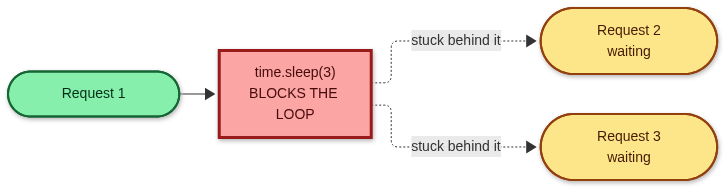
An event loop runs on a single thread. Coroutines cooperate by hitting await. A blocking call like time.sleep(), requests.get(), or a sync DB driver never yields, so nothing else runs.
async def handler():
    time.sleep(3)  # the entire loop is frozen for 3 seconds
The fix: one line
async def handler():
    await asyncio.to_thread(time.sleep, 3)  # loop stays free
Signature: asyncio.to_thread(func, /, *args, **kwargs). Pass the function and its arguments separately. Don't call it yourself.
What actually happens
to_thread hands your function to the loop's default ThreadPoolExecutor. Your coroutine suspends, the loop keeps working, and the result is delivered back when the thread finishes.

Bonus: to_thread copies the current contextvars into the worker. Request IDs, trace IDs, and similar values still work inside the thread.
Proof: three 1-second jobs finish in ~1 second
import asyncio
import time

def blocking_io(n: int) -> str:
    time.sleep(1)  # stand-in for requests.get, file I/O, a sync SDK...
    return f"job {n} done"

async def heartbeat():
    for _ in range(2):
        print("loop is alive")
        await asyncio.sleep(0.5)

async def main():
    start = time.perf_counter()
    results, _ = await asyncio.gather(
        asyncio.gather(*(asyncio.to_thread(blocking_io, i) for i in range(3))),
        heartbeat(),
    )
    print(results, f"in {time.perf_counter() - start:.1f}s")  # ≈ 1.0s, not 3s

asyncio.run(main())

The heartbeat keeps ticking while all three jobs run, so the loop was never blocked.
The same pattern with a real blocking client
Any sync library works the same way. Here it is with the standard library's HTTP client (swap in requests.get or a sync SDK, and nothing else changes):
import asyncio
import time
import urllib.request

def fetch(url: str) -> int:
    with urllib.request.urlopen(url, timeout=10) as resp:  # blocking network call
        return len(resp.read())

async def main():
    urls = ["https://httpbin.org/delay/1"] * 3
    start = time.perf_counter()
    sizes = await asyncio.gather(*(asyncio.to_thread(fetch, u) for u in urls))
    print(sizes, f"in {time.perf_counter() - start:.1f}s")  # roughly 1s, not 3s

asyncio.run(main())
The FastAPI trap
FastAPI runs a plain def endpoint in an external threadpool, but an async def endpoint runs directly on the event loop. So the classic mistake is marking a handler async def and then calling a sync library inside it.
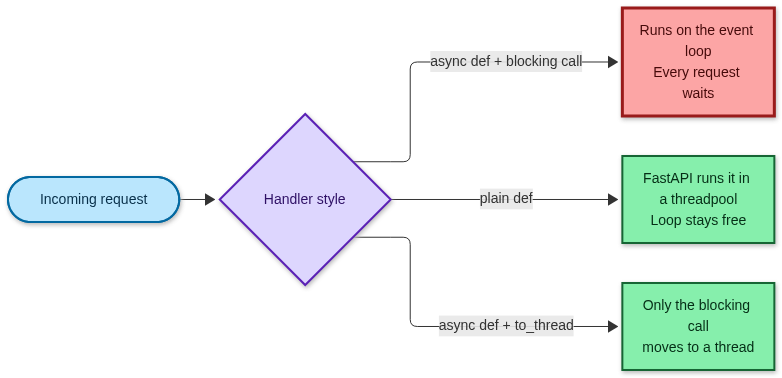
# Bad: blocks the loop for every other request
@app.get("/report")
async def report():
    return legacy_client.fetch_report()  # sync SDK call

# Fix A: plain def, FastAPI offloads the whole handler
@app.get("/report")
def report():
    return legacy_client.fetch_report()

# Fix B: stay async, offload only the blocking call
@app.get("/report")
async def report():
    rows = await db.fetch_rows()  # async-native call
    return await asyncio.to_thread(legacy_client.fetch_report, rows)
Pick B when the handler also awaits other things and only one call is blocking.
When should you use it?

Rule of thumb: threads help when the work is waiting (I/O) or runs in C without the GIL. On a standard build, pure-Python number crunching in a thread won't speed up, because only one thread runs Python bytecode at a time, and it competes with your event loop for that lock.
Free-threaded Python: the free-threaded build (no GIL) became officially supported in Python 3.14 (PEP 779), but it is still opt-in, not the default. On those builds, threads can run Python code in parallel. Benchmark to_thread against processes for your own CPU-heavy workload before choosing.
Gotchas
| Gotcha | What to do |
|---|---|
| Pool is finite. The default is min(32, cpu_count + 4) workers (os.process_cpu_count() on Python 3.13+). | Cap concurrency with an asyncio.Semaphore, or pass your own executor to loop.run_in_executor. |
| The default executor is shared. to_thread uses the same pool asyncio uses for loop.getaddrinfo() (DNS lookups), so a flood of slow jobs can delay unrelated network calls. | Give heavy or slow jobs a dedicated ThreadPoolExecutor with loop.run_in_executor(my_pool, fn). |
| Cancellation doesn't kill the thread. Cancelling the awaiting task stops the await, but the thread runs to completion. | Give blocking calls their own timeouts (requests.get(..., timeout=10)). |
| Thread safety is on you. Shared mutable state needs locks. | Prefer returning values over mutating globals. |
| Don't call asyncio APIs from the worker thread. | Use asyncio.run_coroutine_threadsafe(coro, loop) to talk back to the loop. |
Takeaways
Never block the loop. One sync call can stall every request, in plain asyncio and in FastAPI.
Wrap blocking I/O with
await asyncio.to_thread(fn, *args). It's the simplest fix and the loop stays responsive.Pair it with
asyncio.gatherto run blocking jobs concurrently.Know the limits: the pool is finite and shared, cancellation doesn't stop the thread, and on standard builds the GIL means no CPU speedup. For heavy CPU work, use processes.
Requires Python 3.9+.
Published via ZyVOP — Write once in Markdown, auto-backup to GitHub, and syndicate to Dev.to, Medium & Hashnode in 1 click.
About the author
- One platform to write, cross-post to Dev.to, Medium, WordPress, Hashnode, and Bluesky, and protect your SEO with canonical links. Zero paywalls and full content ownership.
Comments
Join the discussionNo comments yet. Be the first to comment.