# CASL: One Set of Permission Rules for Your Whole JavaScript App
Most apps start with a line like `if (user.role === 'admin')`. Then the same check shows up in a React component, then in an API handler, then in a database query. Six months later nobody remembers which copy is the real rule.
CASL gives those rules one home. You describe what a user can do once. Then you ask the same object the same question from the browser, the server and the data layer.
This post covers what CASL is, how its rules work, how it connects to React, Prisma and Mongoose, and what changed in the v7 release from May 2026.
## What CASL is
CASL (pronounced like "castle") is an isomorphic authorization library for JavaScript. Isomorphic means the same code runs in the browser and on Node.js.
It is written in TypeScript and released under the MIT license. The author and maintainer is Sergii Stotskyi. The README says it was heavily inspired by CanCan, the Ruby authorization library, and links to the CanCanCan fork.
The first release (0.2.0) went out in July 2017, and 1.0.0 followed ten days later. Today the repository has roughly 7,000 stars and more than 1,800 commits. The README puts the core at about 6 KB minified and gzipped.
CASL ships as a set of packages:
| Package | What it does |
| --- | --- |
| @casl/ability | The core: define rules, check permissions |
| @casl/react | React bindings |
| @casl/vue | Vue bindings |
| @casl/angular | Angular bindings |
| @casl/mongoose | Filter Mongoose queries by permission |
| @casl/prisma | Filter Prisma queries by permission |
The README lists Node.js 18 or newer for the core package, and Node.js 20 or newer for the integrations.
## The idea: abilities
CASL works at the level of "what can this user actually do". Each ability has up to four parts.
- **Action.** A verb such as `read`, `update`, or one of your own like `publish`.
- **Subject.** The thing the action applies to, usually a domain entity such as `BlogPost` or `User`.
- **Conditions.** An object that narrows the ability to matching records. This is how you say "only their own posts".
- **Fields.** A list of properties the ability covers. This is how you say "can edit `hidden`, but not `title`".
The README says everything after the action is optional. That is why you can start with simple checks like "can this user publish?" and add subjects, conditions and fields later.
## Defining rules
Rules are written with `can` and `cannot`. Here is the example from the project's README, which turns three business requirements into code.
```typescript
import { AbilityBuilder, createMongoAbility } from '@casl/ability';
function defineAbilitiesFor(user: User) {
const { can, cannot, build } = new AbilityBuilder(createMongoAbility);
// anyone can read blog posts
can('read', 'BlogPost');
// users can do anything to their own posts
can('manage', 'BlogPost', { author: user.id });
// but not delete a post older than a day
cannot('delete', 'BlogPost', {
createdAt: { $lt: Date.now() - 24 * 60 * 60 * 1000 }
});
return build();
}
```
Two special words are worth knowing. `manage` means any action. `all` means any subject. So `can('manage', 'all')` is a full administrator.
`manage` has meant "any action" since version 3.0 in 2019. Before that it was an alias for create, read, update and delete.
`cannot` creates an inverted rule, one that forbids instead of allows.
### Order matters
Rules are not "deny wins". A rule defined later overrides one defined earlier, in either direction.
```typescript
can('manage', 'all');
cannot('delete', 'BlogPost', { published: true });
```
This admin can do everything except delete published posts. Swap the two lines and the broad `can` would override the narrow `cannot`, so deletes would go through.
The changelog has an example of this exact trap. In version 2.x, `cannot('read', 'all')` written after `can('read', 'User', { id: 1 })` did not override it. Version 3.0 fixed that.
## Checking permissions
Once you have an ability, you ask it questions.
```typescript
const ability = defineAbilitiesFor(user);
import { subject, ForbiddenError } from '@casl/ability';
// Type check: can this user read at least one BlogPost?
ability.can('read', 'BlogPost');
// Instance check: can this user manage this specific post?
ability.can('manage', subject('BlogPost', { author: user.id }));
// Throw instead of returning false
ForbiddenError.from(ability).throwUnlessCan('delete', post);
```
The difference between the first two matters. Checking by type answers "is there any post this user could read". Checking an object answers "can they read this one".
The `subject()` helper handles plain objects. Libraries like Prisma return plain objects with no type information, so CASL has no way to know a row is a `BlogPost`. `subject('BlogPost', row)` tells it.
## Where the rules come from
CASL has no built-in roles. You write a function that takes a user and returns rules, like the one above. Roles are just an `if` inside it.
```typescript
if (user.role === 'admin') {
can('manage', 'all');
} else {
can('read', 'BlogPost', { published: true });
can('update', 'BlogPost', { authorId: user.id });
can('delete', 'BlogPost', { authorId: user.id });
}
```
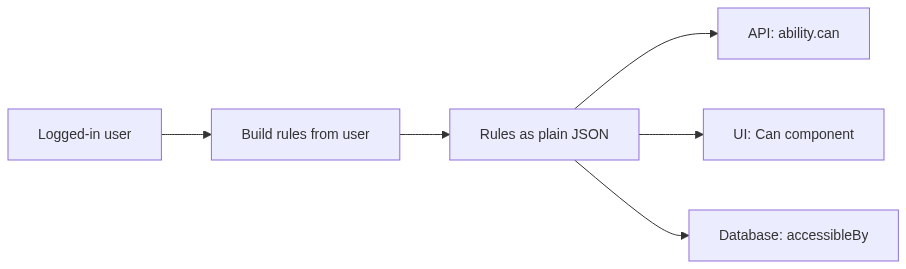
Under the hood, rules are plain data. A rule is an object with an action, a subject, and optionally conditions, fields and an `inverted` flag.
```json
[
{ "action": "read", "subject": "BlogPost" },
{ "action": "update", "subject": "BlogPost", "conditions": { "authorId": 7 } },
{ "action": "delete", "subject": "BlogPost", "conditions": { "published": true }, "inverted": true }
]
```
That is what makes CASL "isomorphic" in practice. The server builds the rules, serializes them, and sends them to the browser. The browser creates an ability from the same JSON.
The core package also has pack and unpack helpers in `@casl/ability/extra` for moving rules around in a compact form. And because rules are data, you can keep them in a database. A maintainer answer in the project's discussions says to pass rows straight to the ability factory.
## Conditions and fields
Conditions use a subset of the MongoDB query language, with operators like `$lt`, `$gt`, `$in` and `$exists`. You do not need MongoDB to use them. The matching runs in JavaScript.
Since version 5, matching is handled by the `@ucast` packages, which replaced the older sift.js library. Nested properties work with dot notation, such as `'address.street'`.
Fields restrict an ability to some properties. In the call, the field list comes before the conditions.
```typescript
// moderators can change the hidden flag, nothing else
can('update', 'BlogPost', ['hidden']);
ability.can('update', post, 'hidden'); // true
ability.can('update', post, 'title'); // false
```
Field patterns are supported too, so a rule can cover `address.*` and everything under it.
## In the browser
The React package gives you a provider, a `Can` component and a `useAbility` hook. This is the v7 API.
```typescript
import { AbilityProvider, Can, useAbility } from '@casl/react';
function App() {
return (
);
}
function Toolbar() {
const ability = useAbility();
return ability.can('create', 'Post') && ;
}
```
The props read like a sentence: "Can I create a Post?". There are aliases like `this` for a single record and `not` to invert the check.
Vue has a plugin and a `useAbility` composable. Angular has an `AblePipe`.
One rule to keep in mind: hiding a button is a courtesy, not security. The server has to run the same check.
## In the database
Checking one record is the easy case. The harder case is a list endpoint. If a user can only see their own posts, you do not want to load every post and filter in memory.
CASL can turn the rules into a query condition instead.
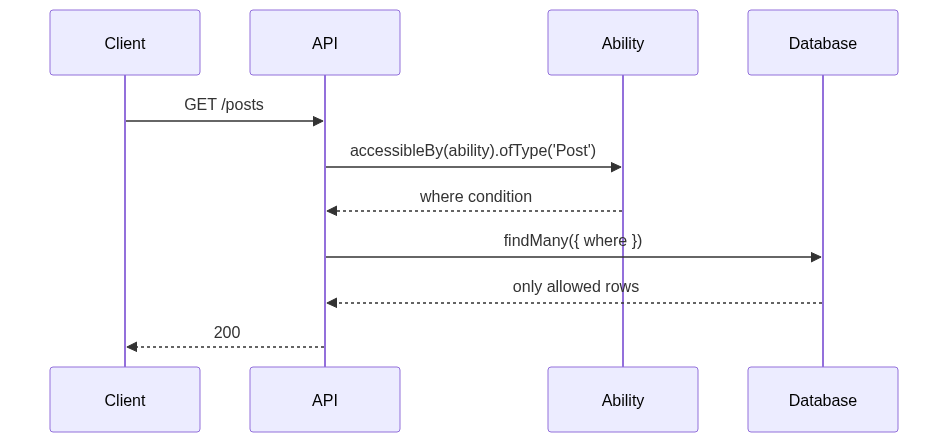
With Prisma, it looks like this.
```typescript
import { PrismaClient } from '@prisma/client';
import { accessibleBy, createCaslExtension } from '@casl/prisma';
const prisma = new PrismaClient().$extends(createCaslExtension());
const posts = await prisma.post.findMany({
where: {
AND: [
accessibleBy(ability).ofType('Post'),
{ /* your own filters */ },
],
},
});
```
The abilities for Prisma are built with `createPrismaAbility`, so conditions are written in Prisma's own `where` syntax. For relations, use Prisma's operators such as `some`, `every` and `none`.
If the user has no access at all, CASL produces a special empty condition. Without the extension, Prisma rejects that query. With the extension, you get an empty result, which is what most people expect.
Mongoose works the same way through `@casl/mongoose`: add `accessibleRecordsPlugin` and call `accessibleBy(ability)` on a model.
## A short history
The changelog is public back to the first release, so the timeline is easy to check.
| Version | Date | What changed |
| --- | --- | --- |
| 0.2.0 | Jul 2017 | First release |
| 1.0.0 | Jul 2017 | Docs and integration examples |
| 2.0.0 | Mar 2018 | Split into @casl/* packages, per-field rules |
| 3.0.0 | Feb 2019 | manage now means any action |
| 4.0.0 | Apr 2020 | Rewritten in TypeScript, subject() helper added |
| 5.x | 2020 to 2021 | sift.js replaced by @ucast, custom "any" names |
| 6.0.0 | Jul 2022 | Angular 13 support |
| 7.0.0 | May 2026 | Ability renamed and slimmed down |
Version 5.0.0 was released by accident and deprecated. Its notes say not to use it, and the fixes landed in later 5.x releases.
## What changed in v7
`@casl/ability` 7.0.0 shipped on May 21, 2026, after a release candidate on May 8. The latest patch at the time of writing is 7.0.1 from June 10. The changelog lists these breaking changes:
- `PureAbility` is now called `Ability`, and it no longer has default options. To get the old behavior, use `createMongoAbility` and the `MongoAbility` type.
- `rulesToQuery` is replaced by `rulesToCondition`.
- Conditions that match everything, like `{}`, are now treated the same as rules with no conditions.
- `rulesFor` and `possibleRulesFor` return read-only arrays.
- `getDefaultErrorMessage` is gone.
The migration for most apps is a rename.
```typescript
// v6
import { Ability } from '@casl/ability';
const ability = new Ability(rules);
// v7
import { createMongoAbility } from '@casl/ability';
const ability = createMongoAbility(rules);
```
The empty-conditions change closes a real bug report. In v6, a rule with `conditions: {}` and one with `conditions: null` behaved differently when a field-specific inverted rule tried to override a general rule. That is easy to hit when rules are generated by a backend in another language.
The same release also fixed query generation to respect rule priority.
The other packages moved with it:
- `@casl/react` 7 replaces `createContextualCan` with `AbilityProvider`. `useAbility` no longer takes a context, and `Can` no longer takes an `ability` prop.
- `@casl/vue` 3 is ESM only.
- `@casl/prisma` 2 needs the Prisma extension, and `accessibleBy` returns a different shape and no longer throws a `ForbiddenError`.
- `@casl/mongoose` 9 removes `accessibleFieldsPlugin` in favor of an `accessibleFieldsBy` helper.
### Upgrade traps teams have reported
Pull requests in public repos show where people got stuck.
- The packages have to move together. One project found that `@casl/react` 6 only accepts `@casl/ability` up to version 6, so bumping the core alone could not build.
- A missing matcher fails at runtime, not compile time. One Angular project switched to the new `Ability` class and hit "Cannot restrict access by conditions without a conditionsMatcher". It only showed up for rules that used conditions or fields.
- Silent denials. Another project moved to `createMongoAbility` specifically to stop condition rules from failing quietly and denying access.
If you use `Ability` as a drop-in, test a rule with a condition and a rule with fields before you ship.
## Gotchas
- **Pick one subject style.** Since 5.1, strings and classes are different subject types and do not match each other. Use strings everywhere or classes everywhere.
- **Plain objects need** `subject()`**.** Without it, CASL cannot tell what type a row is.
- **Type checks are optimistic.** `can('update', 'BlogPost')` can be true even when the user may update only some posts. Check the instance before acting on it.
- **Rule order is the logic.** Build rules from broad to narrow.
- **Client checks are not enforcement.** Run them on the server too.
- **Stay current.** Version 6.7.5, from December 2025, changed `rulesToFields` to ignore potentially insecure fields.
## How it compares
CASL is not the only option, and it is not trying to be the same thing as the others.
Casbin is the closest well-known alternative. It is an Apache project, available in many languages, and it describes access control in model files based on a Policy, Effect, Request and Matchers metamodel. Policies can live in files or in many databases through adapters. That fits teams that want one policy format across several languages and services.
CASL takes the opposite approach. Rules live in your TypeScript code or in JSON, and the library is built around JavaScript apps. In exchange you get things Casbin does not focus on, like the React bindings and query filters for Prisma and Mongoose.
CASL also does not store roles, groups or relationships for you. You bring that data and turn it into rules.
It has a following in the Node ecosystem. Strapi's repository tracks it as a dependency, and `feathers-casl` adds hooks and channels for Feathers.js. NestJS's v9 docs included a CASL walkthrough. The current NestJS docs page describes a separate `@nestjs/authorization` package built around policy classes.
CASL fits best when you have a full-stack JavaScript or TypeScript app and permissions that depend on the record, like ownership or status. It fits less well when you need one central policy service for many languages.
## Getting started
Install the core package.
```bash
npm install @casl/ability
```
Then define and check a rule.
```typescript
import { AbilityBuilder, createMongoAbility, subject } from '@casl/ability';
const { can, build } = new AbilityBuilder(createMongoAbility);
can('read', 'BlogPost');
can('update', 'BlogPost', { authorId: 7 });
const ability = build();
ability.can('read', 'BlogPost'); // true
ability.can('update', subject('BlogPost', { authorId: 7 })); // true
ability.can('update', subject('BlogPost', { authorId: 8 })); // false
```
The author also keeps a separate examples repository, including a Fastify and Prisma blog app.
## Where it stands
CASL is a small, focused library that has been around since 2017 and is still shipping. The v7 line cleaned up its defaults and its React, Vue, Prisma and Mongoose packages in one pass. Releases are automated, and recent package releases landed as late as August 2026.
If you are on v6, the upgrade is small but it is not free. Move the packages together, switch to `createMongoAbility`, and test your conditional rules.
## Sources
- CASL repository and README: github.com/stalniy/casl
- CASL releases and changelogs: github.com/stalniy/casl/releases
- CASL documentation: casl.js.org
- CASL examples: github.com/stalniy/casl-examples
- Apache Casbin: casbin.apache.org
- NestJS authorization docs: docs.nestjs.com/security/authorization
---
*Published via [ZyVOP](https://zyvop.com/casl-one-set-of-permission-rules-for-your-whole-javascript-app-birx1?utm_source=hashnode&utm_medium=crosspost&utm_campaign=syndication) — Write once in Markdown, auto-backup to GitHub, and syndicate to Dev.to, Medium & Hashnode in 1 click.*