
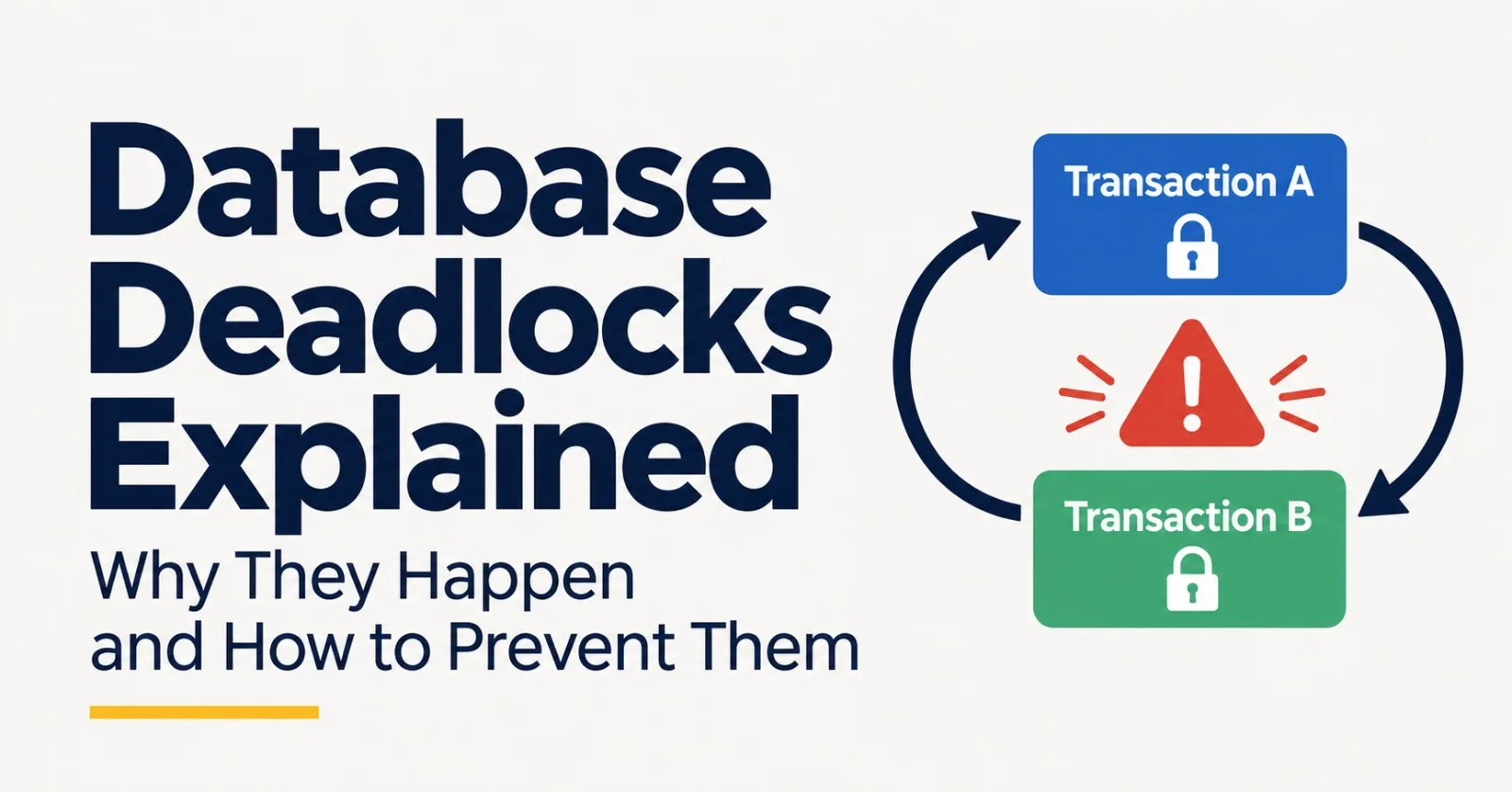
Two transactions, two locks and a circular wait: how databases detect and break deadlocks, what causes most of them, and the fixes that work, from lock ordering to safe retries.
Everything passes in testing. Then, in production, a request fails with “deadlock detected.” Each SQL statement is correct, and running the two transactions one after the other works fine. The problem is the timing between them.
A deadlock isn’t a database bug. It is what happens when two transactions each wait for something the other one holds. You can’t remove deadlocks entirely, but you can make them rare and harmless.
This post explains how a deadlock forms, how PostgreSQL, MySQL and SQLite deal with one, and four fixes. The experiments use real threads and SQLite, and the scripts are at the end.
What a deadlock is
When a transaction changes a row, it locks that row until it commits or rolls back. Any other transaction that wants the same row has to wait.
Waiting is normal and usually short. A deadlock is different: two transactions each hold a lock that the other one needs, so neither can ever continue.

Here A moves money from account 1 to account 2, while B moves money the other way. Each locks its first row, and each then waits for the row the other one holds. You can reproduce it in two sessions:
-- 1. Session A
BEGIN;
UPDATE accounts SET balance = balance - 10 WHERE id = 1;   -- locks row 1

-- 2. Session B
BEGIN;
UPDATE accounts SET balance = balance - 20 WHERE id = 2;   -- locks row 2

-- 3. Session A
UPDATE accounts SET balance = balance + 10 WHERE id = 2;   -- waits for B

-- 4. Session B
UPDATE accounts SET balance = balance + 20 WHERE id = 1;   -- waits for A: deadlock
You don’t need explicit locking for this. PostgreSQL’s manual notes that deadlocks can happen from ordinary row locks, even if you never ask for a lock.
A long wait is not the same thing as a deadlock. A transaction stuck behind a slow one is just waiting, and it will continue when the slow one commits. A deadlock is a cycle, and nothing inside it can ever finish.
How databases break a deadlock
Databases keep track of who is waiting for whom. Transactions are the nodes, each “waits for” is an arrow, and a cycle means deadlock. Cycles can involve more than two transactions.

The database breaks the cycle by choosing a victim, rolling it back and releasing its locks. The other transaction then continues, and the victim’s client gets an error. Each database does this a little differently:
PostgreSQL doesn’t look for cycles the moment a wait starts, because the check is relatively expensive. It waits
deadlock_timeoutfirst, which is one second by default. The manual says which transaction gets aborted is hard to predict and shouldn’t be relied on.MySQL’s InnoDB detects deadlocks by default and rolls back one transaction, usually the one that changed fewer rows. If detection is turned off, InnoDB relies on
innodb_lock_wait_timeoutinstead.SQLite has no row locks, because it locks the whole database. It can still deadlock when a connection holding a read lock tries to write. According to its documentation, when waiting could deadlock, SQLite returns
SQLITE_BUSYimmediately instead of waiting. A demo below shows this.
What your application sees:
| Database | Error | Code |
|---|---|---|
| PostgreSQL | ERROR: deadlock detected | SQLSTATE 40P01 |
| MySQL (InnoDB) | Deadlock found when trying to get lock; try restarting transaction | Error 1213, SQLSTATE 40001 |
| SQLite | database is locked, returned immediately | SQLITE_BUSY |
Don’t confuse a deadlock with a lock wait timeout. MySQL’s error 1205 means a transaction waited the full innodb_lock_wait_timeout (50 seconds by default) for a lock held by a slow or stuck transaction. There was no cycle, and by default only the statement is rolled back. A deadlock (1213) rolls back the whole transaction.
Four patterns behind most deadlocks
Opposite lock order. Two transactions touch the same rows in different orders, like the transfers above.
Lock upgrades. A transaction reads a row, which takes a shared lock, and later updates it, which needs a stronger one. If two transactions do this to the same row, each waits for the other’s shared lock to go away.
Locking too much. An
UPDATEwithout a useful index can scan and lock many rows, which makes overlaps far more likely. MySQL’s manual advises indexing the columns used inSELECT ... FOR UPDATEandUPDATE ... WHERE.Holding locks too long. Slow work inside a transaction, such as a network call or waiting for a user, keeps locks held and widens the window for an overlap. PostgreSQL waits indefinitely for a lock as long as no deadlock exists.
The four fixes below follow the same order.
Fix 1: Lock in a consistent order
PostgreSQL’s manual says the best defense is to make sure all applications acquire locks on multiple objects in a consistent order. Its own deadlock example adds that if both transactions had updated the rows in the same order, no deadlock would have occurred.

B still waits, but A never needs anything from B, so there is no cycle. B simply continues when A commits.
The easiest rule is to sort by primary key. For a transfer, lock the lower account id first, whichever direction the money moves:
BEGIN;
SELECT id FROM accounts WHERE id IN (1, 2) ORDER BY id FOR UPDATE;   -- locks the rows in id order
UPDATE accounts SET balance = balance - 10 WHERE id = 1;
UPDATE accounts SET balance = balance + 10 WHERE id = 2;
COMMIT;
The same idea applies across tables. MySQL’s manual recommends using the same order of operations in every transaction that updates multiple tables.
To measure the effect, I ran four threads making 400 transfers in total between 8 accounts, with one lock per account. The locks stand in for row locks, because I couldn’t run PostgreSQL or MySQL here. A wait of more than 20 ms for the second lock counted as a deadlock, and the thread gave up and retried after a short random delay:
| Lock order | Deadlocks per run (median of 5 runs) | Range |
|---|---|---|
| From account, then to account | 19 | 14 to 23 |
| Sorted by account id | 0 | 0 to 0 |
Fix 2: Take the strongest lock first
PostgreSQL’s manual says the first lock a transaction takes on an object should be the strongest mode it will need. For row work, that means locking the row for update before you read it, instead of reading first and writing later.

In PostgreSQL and MySQL, make SELECT ... FOR UPDATE your first read. In SQLite, use BEGIN IMMEDIATE, which takes the write lock up front. SQLite makes the problem easy to see, because it refuses to wait when waiting can’t help. This is what my demo printed:
B: failed after 0.000 s (database is locked), although it was willing to wait 5 s
A: committed, balance = 150
BEGIN IMMEDIATE: both committed, balance = 180; the second one waited 0.33 s
With a plain BEGIN, both connections read first, so both hold a read lock. A’s update gets the write lock, but B’s fails instantly, because A can’t commit until B releases its read lock. Without a retry, B’s deposit of 30 is lost, and the balance ends at 150 instead of 180.
With BEGIN IMMEDIATE, the second connection waits its turn, about 0.33 seconds here, and both deposits land.
Fix 3: Lock less, and for less time
Keep transactions short. Do slow work, such as network calls, before the transaction starts or after it commits. Never wait for user input inside one.
Index the columns in your
WHEREclauses. A query that can find its rows through an index locks fewer of them.Lock only what you need. Locking isn’t free: PostgreSQL’s manual notes that locking a row can cause a disk write.
Let workers skip locked rows. For job queues,
SELECT ... FOR UPDATE SKIP LOCKEDlets each worker take rows that no other worker holds, instead of waiting for them.Put a ceiling on waiting. PostgreSQL has
lock_timeout, and MySQL hasinnodb_lock_wait_timeout. A wait that ends with an error is easier to handle than one that never ends.
Don’t expect the isolation level to solve this. MySQL’s manual says the possibility of deadlocks isn’t affected by the isolation level, because the level changes how reads behave and deadlocks come from writes.
Fix 4: Retry, because some will still happen
Even correct code gets picked as a victim sometimes. MySQL’s manual is blunt: even if your application logic is correct, you must still handle the case where a transaction has to be retried. PostgreSQL’s manual says the same for deadlocks you can’t prevent.
The error message tells you what to do. A deadlock rolls back the whole transaction, so you restart from the beginning, not from the statement that failed.

The helper is short:
import random, time

RETRYABLE = {'40P01', '40001'}   # PostgreSQL deadlock_detected and serialization_failure; MySQL error 1213 also reports 40001

class DatabaseError(Exception):
    def __init__(self, message, sqlstate):
        super().__init__(message)
        self.sqlstate = sqlstate

def run_transaction(work, max_attempts=5, base=0.05, cap=2.0, sleep=time.sleep):
    for attempt in range(1, max_attempts + 1):
        try:
            return work()                      # work() begins, runs and commits one whole transaction
        except DatabaseError as err:
            if err.sqlstate not in RETRYABLE or attempt == max_attempts:
                raise
            sleep(random.uniform(0, min(cap, base * 2 ** attempt)))    # random, growing delay
Map your driver’s exception to the SQLSTATE, then follow these rules:
Retry the whole transaction, never only the failed statement.
Make the work safe to repeat. Don’t send an email or call a payment API inside the transaction. Do it after the commit, or make it idempotent.
Cap the attempts and randomize the delay, so two victims don’t collide again at the same moment.
Log every deadlock. A rising count points at a pattern you can fix.
Finding deadlocks in production
PostgreSQL logs every deadlock. The message names the processes involved, and the server log shows their statements:
ERROR:  deadlock detected
DETAIL:  Process 12345 waits for ShareLock on transaction 67890; blocked by process 67890.
         Process 67890 waits for ShareLock on transaction 12345; blocked by process 12345.
HINT:  See server log for query details.
These tools help:
PostgreSQL:
log_lock_waits = onlogs waits longer thandeadlock_timeout, thedeadlockscolumn inpg_stat_databasecounts them per database, and thepg_locksview shows who is waiting right now.MySQL:
SHOW ENGINE INNODB STATUSshows the most recent deadlock, andinnodb_print_all_deadlockswrites every one to the error log.
When you read a report, look for the two statements and the order in which each one took its locks. That order is nearly always the cause.
Measure it yourself
I couldn’t run PostgreSQL or MySQL in my sandbox, so the SQL above follows their documentation, and the experiments use Python threads and SQLite. The first script produced the lock-order table. Its numbers vary slightly between runs, because thread timing does:
import random, statistics, threading, time

ACCOUNTS, THREADS, TRANSFERS = 8, 4, 100      # 4 workers, each making 100 transfers between 8 accounts
locks = [threading.Lock() for _ in range(ACCOUNTS)]

def transfer(a, b, ordered, stats, rng):
    first, second = sorted((a, b)) if ordered else (a, b)    # ordered: always lock the lower id first
    while True:
        locks[first].acquire()
        time.sleep(0.0005)                                    # some work while holding the first lock
        if locks[second].acquire(timeout=0.02):               # waiting this long almost certainly means deadlock
            time.sleep(0.0005)
            locks[second].release()
            locks[first].release()
            return
        locks[first].release()                                # give up, as a database does with its victim
        stats['deadlocks'] += 1
        time.sleep(rng.uniform(0, 0.01))                      # random delay, then retry the transfer

def worker(seed, ordered, stats):
    rng = random.Random(seed)
    for _ in range(TRANSFERS):
        a, b = rng.sample(range(ACCOUNTS), 2)                 # from-account, to-account
        transfer(a, b, ordered, stats, rng)

def run(ordered):
    stats = {'deadlocks': 0}
    start = time.perf_counter()
    threads = [threading.Thread(target=worker, args=(i, ordered, stats)) for i in range(THREADS)]
    for t in threads: t.start()
    for t in threads: t.join()
    return stats['deadlocks'], time.perf_counter() - start

if __name__ == '__main__':
    print(f'{"lock order":26} {"deadlocks (median of 5 runs)":>28} {"range":>9} {"seconds":>8}')
    for name, ordered in (('as given (from, then to)', False), ('sorted by account id', True)):
        runs = [run(ordered) for _ in range(5)]
        d = [r[0] for r in runs]
        print(f'{name:26} {statistics.median(d):>28.0f} {min(d):>4}-{max(d):<4} {statistics.median(r[1] for r in runs):>8.1f}')
    print('transfers per run:', THREADS * TRANSFERS)
The second script reproduces the SQLite lock-upgrade deadlock and its fix, and its output is deterministic:
import os, sqlite3, threading, time

DB = 'upgrade.db'

def fresh():
    if os.path.exists(DB):
        os.remove(DB)
    con = sqlite3.connect(DB)
    con.execute('CREATE TABLE accounts(id INTEGER PRIMARY KEY, balance INTEGER)')
    con.execute('INSERT INTO accounts VALUES (1, 100)')
    con.commit()
    con.close()

def connect():
    return sqlite3.connect(DB, timeout=5, isolation_level=None)   # wait up to 5 s for locks, manual transactions

def balance():
    return connect().execute('SELECT balance FROM accounts WHERE id = 1').fetchone()[0]

# 1. read first, write later (a plain BEGIN): both connections hold a read lock, then both want to write
fresh()
a, b = connect(), connect()
for con in (a, b):
    con.execute('BEGIN')
    con.execute('SELECT balance FROM accounts WHERE id = 1').fetchone()
a.execute('UPDATE accounts SET balance = balance + 50 WHERE id = 1')       # A gets the write lock
started = time.perf_counter()
try:
    b.execute('UPDATE accounts SET balance = balance + 30 WHERE id = 1')   # B asks for it too
    print('B: succeeded')
except sqlite3.OperationalError as err:
    print(f'B: failed after {time.perf_counter() - started:.3f} s ({err}), although it was willing to wait 5 s')
b.execute('ROLLBACK')                                                       # B gives way, like a deadlock victim
a.execute('COMMIT')                                                         # now A can commit
print('A: committed, balance =', balance())

# 2. take the write lock first (BEGIN IMMEDIATE): the second connection simply waits its turn
fresh()
waited = {}
def deposit(amount, delay):
    time.sleep(delay)
    con = connect()
    t = time.perf_counter()
    con.execute('BEGIN IMMEDIATE')                                          # wait here, before reading anything
    waited[amount] = time.perf_counter() - t
    current = con.execute('SELECT balance FROM accounts WHERE id = 1').fetchone()[0]
    time.sleep(0.3)                                                         # some work inside the transaction
    con.execute('UPDATE accounts SET balance = ? WHERE id = 1', (current + amount,))
    con.execute('COMMIT')
threads = [threading.Thread(target=deposit, args=(50, 0.0)), threading.Thread(target=deposit, args=(30, 0.05))]
for t in threads: t.start()
for t in threads: t.join()
print(f'BEGIN IMMEDIATE: both committed, balance = {balance()}; the second one waited {waited[30]:.2f} s')
Wrapping up
Deadlocks come from a simple pattern: two transactions each hold one lock and wait for another. A consistent lock order and the strongest lock first prevent most of them. Short transactions and good indexes make the rest rarer.
For the ones that remain, let your application retry the whole transaction when the database picks it as the victim.
Published via ZyVOP — Write once in Markdown, auto-backup to GitHub, and syndicate to Dev.to, Medium & Hashnode in 1 click.
About the author
- One platform to write, cross-post to Dev.to, Medium, WordPress, Hashnode, and Bluesky, and protect your SEO with canonical links. Zero paywalls and full content ownership.
Comments
Join the discussionNo comments yet. Be the first to comment.