Canva is a great tool. Even Doory's own README says so.
But if you've used any online design tool for a while, you know the pattern. The free plan gets you started, the good features sit behind a paid plan, and your files live on someone else's servers.
Doory takes a different route. It's a full design editor that runs in your browser. Every feature is free. And you can run the whole thing on your own machine.
I spent some time going through the repo and its README. This post covers what Doory is, what's inside, how to set it up, and where I'd be careful.
💡 Quick take: Doory is a young project with a lot packed into it. If you want a free, self-hostable design editor, it's worth a look. If you need a huge template library today, read the "Things to watch" section first.
What is Doory?
Doory is an open-source design editor made by a developer called Siam (GitHub: shaongitbd). You can make posters, social posts, stories, slides, invitations, resumes, thumbnails and business cards.
You can start from a template or a blank page. Then you can export to PNG, JPG, SVG, PDF, MP4 or GIF.
Here are the basics at a glance:
| What it is | A browser-based design editor, like Canva |
| Price | Free, every feature |
| Account needed? | No, you can start designing right away |
| Self-hosting | Yes, with Docker Compose |
| Frontend | React 19, TypeScript, Vite |
| Backend | Django 5, PostgreSQL |
| License | Attribution Assurance License |
| Website | doory.art |
| Repo | github.com/shaongitbd/doory |
Why people might pick it
The README gives four reasons. I think they hold up as a good way to explain the project.
1. Free, for real. There is no Pro plan, no locked templates, no watermarks and no ads. Tools like background removal and video export are open to everyone.
2. Start in one click. You open the editor and design. If you're a guest, your work is saved in the browser. When you decide to make an account, your designs move over in one step.
3. Yours to host. One docker compose up runs the app, the API, the database and live collaboration on your own server. Your designs and uploads stay with you.
4. A real editor. This isn't a toy canvas. More on that next.
What's inside the editor
Here is the feature list from the README, grouped so it's easier to read.
| Area | What you get |
|---|---|
| Text | Headings, curved text, text effects, font pairings, bulleted and numbered lists, an open-licensed font catalogue, and your own uploaded fonts |
| Elements | Shapes, lines and arrows, about 25,000 icons, emoji and illustrations, stickers, QR codes |
| Photos | Upload, crop, masks and filters, one-click background removal, stock photo search |
| Layout | Layers with lock and hide, groups, alignment guides, snapping, rulers, multi-page designs, magic resize |
| Motion | Enter, exit and emphasis animations and page transitions on a timeline |
| Sound | Music loops, sound effects, uploads, voiceover recording, trims and fades |
| Present | Present mode with speaker notes, timing, auto-advance, a laser pointer and a second presenter window |
| Together | Share links, comments, version history, real-time co-editing |
| Brand | Brand kits with your colours, fonts and logos |
| Export | PNG, JPG, SVG, PDF, MP4, WebM and animated GIF |
A few of these deserve a closer look.
Background removal that runs in your browser
The background removal model runs in the browser, not on a remote service. That matters if you care about where your photos go.
On a self-hosted setup you install the model with one command: sync_models.
Animation and video
Doory has 27 enter and exit animations, 12 emphasis effects and 16 page transitions. There is also a built-in audio library with 24 music loops and 88 sound effects, all CC0.
You can present a design, or export it as MP4, WebM or an animated GIF. The README says these exports are made in your browser.
Print-ready PDFs
If you're designing something to print, you can get a PDF with bleed and crop marks. That's a detail you only find in tools that were built with real use in mind.
Working together
You can share a design with a link that lets people view, comment or edit. Links can be password protected. There are pinned comments, version history, and real-time co-editing with live cursors.
Templates: the honest part
Doory ships with ten starter templates:
Gig poster
Wedding invitation
Event story
Sale post
Café flyer
Quote card
Resume
YouTube thumbnail
Pitch deck
Business card
Each one has its own palette, uses open-licensed fonts, and is fully editable. You can add your own templates in the admin area and browse them by category, size and orientation.
Ten is a small number. Canva has a very large library, and Doory's README says so itself. If you live on templates, this is the biggest gap.
Doory vs Canva
The README has its own comparison table. Keep in mind that it comes from the Doory author, so it shows their point of view.
| Doory | Canva | |
|---|---|---|
| Price | Free, every feature | Free plan, paid Pro and Teams plans |
| Open source | Yes | No |
| Run it on your own server | Yes | No |
| Design without an account | Yes | No |
| Files stay on infrastructure you control | Yes | No |
| Real-time co-editing and comments | Yes | Yes |
| Animation, video and GIF export | Yes | Yes |
| Background removal | Yes, in your browser | Yes |
| Template library | 10 starter templates, plus any you add | A very large library |
The pattern is clear. Doory wins on openness and control. Canva wins on content.
How it's built
Here is the stack, straight from the README:
In the browser: React 19, TypeScript, Vite, Fabric.js, Yjs and Zustand
On the server: Django 5, Django REST Framework, Channels and PostgreSQL
Around it: Docker Compose with nginx, optional Redis and S3-compatible storage
The README explains the request flow in one line. The web container serves the app and forwards /api and /ws to the backend, so the browser only talks to one address.
Here is how that looks:
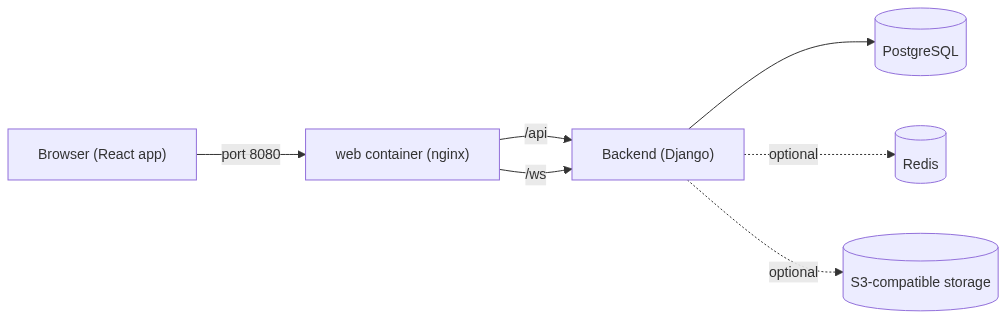
My guess is that Yjs handles the shared document state for co-editing, and Channels carries it over WebSockets. I haven't dug into the code to confirm that, so treat it as a guess.
Self-hosting it
This is where the project shines. The README promises three commands, and that is what it shows.
cp .env.example .env     # set DJANGO_SECRET_KEY and POSTGRES_PASSWORD
docker compose up -d --build
docker compose exec api python manage.py createsuperuser
Then open http://localhost:8080 and start designing.
⚠️ Before you run it: the
.envfile needs aDJANGO_SECRET_KEYand aPOSTGRES_PASSWORD. The README suggestsopenssl rand -base64 48for the secret key.
A new site starts empty
This surprised me a little. A fresh install has no templates, icons, fonts or audio. You add them yourself with a few commands:
docker compose exec api python manage.py seed_gallery         # template categories
docker compose exec api python manage.py sync_fonts --popular 100
docker compose exec api python manage.py seed_templates       # the starter templates
docker compose exec api python manage.py seed_elements        # shapes and graphics
docker compose exec api python manage.py sync_element_packs   # icons, emoji and illustrations
docker compose exec api python manage.py sync_models          # background removal model
docker compose exec api python manage.py sync_audio           # music and sound effects
It's a small extra step, but it's good to know about before you wonder where all the content went.
Settings worth knowing
These live in your .env file:
| Setting | What it does |
|---|---|
| SITE_URL | The public address of the site, like https://doory.example.com, with no trailing slash |
| DJANGO_ALLOWED_HOSTS | The host names the site answers to, comma separated |
| SECURE_SSL_REDIRECT, SECURE_COOKIES | Set to true behind HTTPS, false for plain http:// |
| EMAIL_URL, DEFAULT_FROM_EMAIL | SMTP settings. Without them, emails are printed to the API log |
| WEB_PORT, WEB_BIND | Where the site is published (default 0.0.0.0:8080) |
| INSTALL_CHROMIUM | Set to false to skip the headless browser that server-side PDF export needs |
| GOOGLE_CLIENT_ID | Turns on "Sign in with Google" |
| UNSPLASH_ACCESS_KEY, PEXELS_API_KEY | Turn on stock photo search |
| USE_S3 and AWS_* | Store uploads in S3-compatible storage instead of a local volume |
Running it for development
If you want to hack on it instead:
make setup     # virtualenv, dependencies, local database
make dev-api   # API on http://localhost:8000
make dev-web   # app on http://localhost:5173 (second terminal)
Run make help to see the other targets, like tests and lint.
Where do your designs live?
This is a fair question for any design tool, and the README answers it clearly:
Guest designs and their images stay in the browser, on that device.
Signed-in designs are stored on the server that runs Doory. If you self-host, that's your server.
Uploads can go to a local volume or to S3-compatible storage.
One thing follows from this. If you design as a guest and then clear your browser data, that work is tied to the browser. If you care about keeping a design, make an account.
The license: read this part
Doory uses the Attribution Assurance License. You can use it, change it and redistribute it, including for commercial work.
But there's a condition. You must credit the author. That means keeping the license and NOTICE files with the code, and showing a credit line in the running app. The credit names Siam and links to the repo.
📌 Worth knowing: if you plan to host Doory for your own users or your business, the credit has to be visible in the app. Read the
LICENSEandNOTICEfiles yourself before you commit. I'm not a lawyer, and this is a summary of what the README says.
Third-party software, fonts and content keep their own licenses. Those are listed in THIRD_PARTY.md.
Things to watch
I like the ambition here. But a few facts are worth knowing before you build on it.
It's early. When I looked, the repo had 6 commits, 3 stars, 0 forks and 16 pull requests. That's a young project with a small community. Expect rough edges, and don't assume a big team is behind it.
The template library is small. Ten starters is a good base. It's not a Canva replacement for someone who wants thousands of ready-made layouts.
Setup takes more than three commands. The three commands get the app running. Getting templates, fonts, icons and audio in place takes the extra seed steps above.
You become the admin. Self-hosting is the whole point, but it also means you handle updates, backups and email setup. That's real work.
The comparison table is the author's view. I didn't verify Canva's current features, so check them if the details matter to you.
Who should try it?
Doory looks like a good fit if you:
want a free design tool with no paywalled features
care about keeping files on your own infrastructure
run a small team, community or school and want one shared editor
like reading and contributing to open-source projects
It's probably not the right fit if you need a huge template library today, or you don't want to look after a server.
Final thoughts
What I like most about Doory is how complete the feature list is for an open-source project. Layers, animation, video export, print-ready PDFs and live co-editing are not small things to build.
It's young, and the template library is small. But the direction is clear, and the three-command setup makes it easy to try.
If you're curious, start here:
Website: doory.art
Source code: github.com/shaongitbd/doory
And if the project is useful to you, the README asks for a ⭐ on GitHub. It helps other people find it.
Published via ZyVOP — Write once in Markdown, auto-backup to GitHub, and syndicate to Dev.to, Medium & Hashnode in 1 click.
About the author
- One platform to write, cross-post to Dev.to, Medium, WordPress, Hashnode, and Bluesky, and protect your SEO with canonical links. Zero paywalls and full content ownership.
Comments
Join the discussionNo comments yet. Be the first to comment.