

"Frontend architecture" sounds like one decision, but it's really four that people tend to blur together:
Rendering: where does the HTML come from?
Code organization: how is the codebase structured?
State and data flow: how does data move through the UI?
System scale: how do many teams ship one product?
This post walks through the main patterns in each group: what problem it solves, how it works, and where it hurts. Patterns aren't mutually exclusive. A real app usually mixes several from each group.

1. Rendering Patterns
The first question: when and where is the HTML produced?

SPA / CSR (Client-Side Rendering)
The server returns an empty HTML shell and a JavaScript bundle. The browser builds the UI and fetches data on its own.
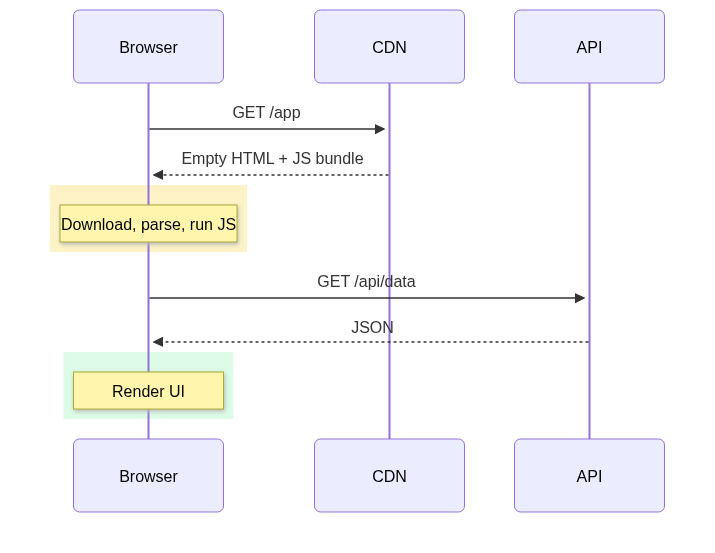
Pros: instant in-app navigation, rich interactivity, simple static hosting.
Cons: slow first paint, weaker SEO unless you add SSR or pre-rendering, large bundles.
Use for: dashboards, admin panels, anything behind a login.
MPA (Multi-Page Application)
Every navigation is a full request that returns a ready-made HTML page. It's the original web model, and it's having a comeback through HTML-over-the-wire tools like htmx and Hotwire, plus the View Transitions API for smooth page changes.
Pros: simple, SEO-friendly, works without JavaScript.
Cons: full reloads, hard to carry client state across pages.
Use for: content sites and form-heavy apps.
SSR (Server-Side Rendering)
The server renders HTML on every request, then JavaScript hydrates it to make it interactive.

Pros: fast first paint, great SEO, always-fresh data.
Cons: server cost, slower time to first byte, and a hydration gap where the page looks ready but isn't clickable yet.
Edge SSR is the same idea running on CDN nodes close to the user, which cuts latency.
SSG (Static Site Generation)
Pages are rendered once at build time and served from a CDN. It's the fastest and cheapest option, but content is only as fresh as the last build, and build times grow with page count. Perfect for docs, blogs, and marketing sites.
ISR (Incremental Static Regeneration)
SSG with an expiry date. Pages are served from cache and regenerated in the background when they go stale (stale-while-revalidate).

Great for product catalogs and news: thousands of pages that change occasionally.
Streaming SSR and React Server Components
Streaming sends HTML in chunks as each <Suspense> boundary resolves, so one slow query doesn't block the whole page.
React Server Components (RSC) go further. Server components run only on the server and ship zero JavaScript. Only components marked as client components get hydrated.
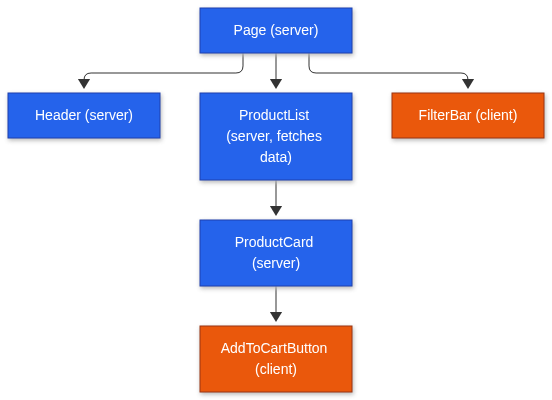
Blue = server only, orange = hydrated in the browser. The trade-off is a new mental model: you have to think about the server/client boundary and what can cross it (only serializable props).
Islands and Resumability
Islands (Astro, Fresh): a page is mostly static HTML with small interactive "islands" that hydrate independently, often only when they scroll into view.

Resumability (Qwik) goes one step further. App state is serialized into the HTML, so the browser can resume where the server left off with no hydration step. Code is lazy-loaded as the user interacts.
Quick Comparison
| Pattern | HTML is made | First load | SEO | Good for | Common tools |
|---|---|---|---|---|---|
| SPA / CSR | In the browser | Slower | Weaker by default | Dashboards, internal tools | Vite + React/Vue, Angular |
| MPA | On the server, per page | Fast | Great | Content sites, forms | Rails, Laravel, Django, htmx |
| SSR | On the server, per request | Fast | Great | Personalized pages, e-commerce | Next.js, Nuxt, SvelteKit, React Router |
| SSG | At build time | Fastest | Great | Docs, blogs, marketing | Astro, Eleventy, Hugo |
| ISR | At build, refreshed in background | Fastest | Great | Catalogs, news | Next.js, Nuxt |
| Streaming + RSC | On the server, in chunks | Fast, progressive | Great | Data-heavy pages | Next.js (App Router) |
| Islands | At build or request, JS only where needed | Fast | Great | Content sites with some interactivity | Astro, Fresh |
2. Code Organization Patterns
The second question: how do you structure the code so it stays maintainable?
Component-Based Architecture
The foundation of React, Vue, Angular, and Svelte. The UI is a tree of small, reusable, encapsulated components: props flow down, events flow up.
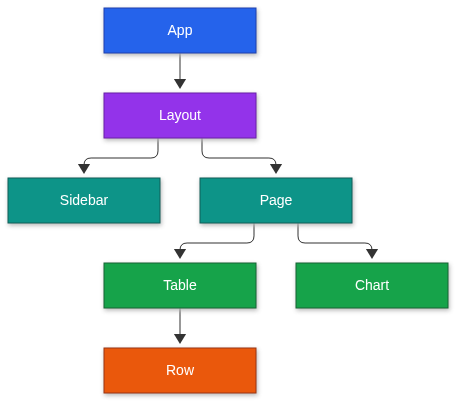
A common refinement is separating logic from presentation (the old container/presentational split, today usually done with custom hooks or composables).
Atomic Design
A shared vocabulary for component levels, from smallest to largest.

Great for design systems. Less helpful for deciding where business logic lives.
Feature-Based and Feature-Sliced Design
Group code by feature, not by file type. Instead of components/, hooks/, and services/ folders that scatter one feature across the tree, each feature owns its UI, state, and API code.
src/
  features/
    cart/
      ui/
      model/
      api/
    checkout/
  entities/
    product/
  shared/
Feature-Sliced Design formalizes this into layers with one strict rule: imports only go downward.

Layered, Clean, and Hexagonal Frontend
Keep business rules independent of the framework and the backend. The UI calls use cases, use cases talk to ports (interfaces), and adapters (REST client, GraphQL, localStorage) implement them.
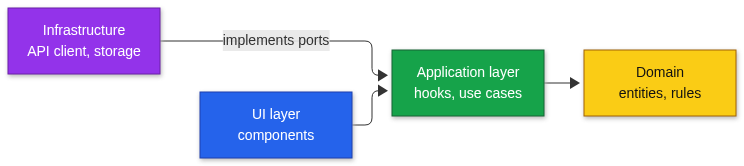
It pays off in long-lived apps with complex domain logic or several clients. For a marketing site it's overkill.
MVC, MVP, and MVVM
Older patterns that separate data, display, and glue code. They're still the mental model behind many frameworks.
| Pattern | Glue layer | How the view updates | Seen in |
|---|---|---|---|
| MVC | Controller handles input and updates the model | View reads from the model | Backbone, server-rendered frameworks |
| MVP | Presenter drives a passive view | Presenter calls view methods | GWT, older mobile apps |
| MVVM | ViewModel exposes observable state | Data binding | Angular, Vue, Knockout |
3. State and Data Flow Patterns
The third question: how does data move, and who owns it?
Unidirectional Data Flow (Flux / Redux)
Data moves in one direction in a loop, so every change is traceable.

Redux Toolkit and NgRx follow this model strictly; Zustand and Pinia are lighter store-based cousins. The cost is boilerplate; the payoff is predictability and great devtools.
Reactive State and Signals
Instead of re-rendering a component tree, fine-grained reactivity tracks which DOM nodes depend on which values and updates only those. Solid and Svelte 5 work this way by default, and Preact Signals can too when a signal is bound directly in JSX. Vue and Angular use the same dependency-tracking idea (refs, signals) but still update at the component level.

In a Solid-style framework, when count changes only the two text nodes update and no component function re-runs.
Server State vs Client State
Most "global state" is really cached server data. Treat the two separately. Let TanStack Query, SWR, or RTK Query handle fetching, caching, deduping, and revalidation, and keep only true UI state (modals, form drafts) in a client store.
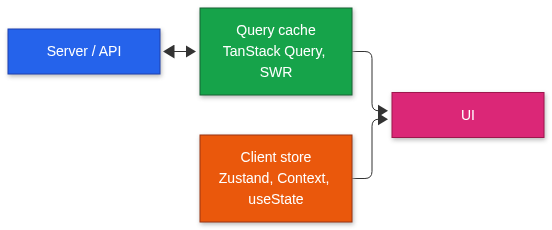
This one split deletes a surprising amount of Redux code in most apps.
State Machines and Statecharts
Model the UI as explicit states and allowed transitions (XState is the popular library), so impossible combinations like "loading and error at the same time" can't exist.

Other styles you'll meet: atomic stores (Jotai, Recoil), proxy-based mutable state (MobX, Valtio), and the URL itself as state for filters and pagination.
4. System-Scale Patterns
The fourth question: how do many people and many apps fit together?
Micro-Frontends
Split a large UI into independently built and deployed slices owned by different teams, composed by a shell.
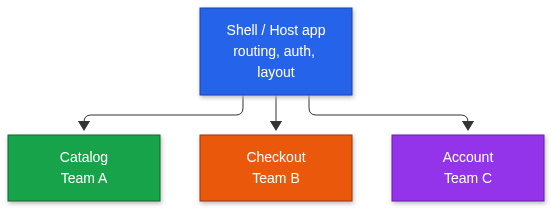
Integration options include Module Federation (runtime), iframes, Web Components, server or edge composition, and plain build-time npm packages. The costs are duplicated dependencies, inconsistent UX, and operational complexity. It's worth it only when team autonomy is the real bottleneck, not as a default.
Monorepo with Shared Packages
Keep several apps and shared libraries (UI kit, utils, config) in one repo using Nx, Turborepo, or pnpm workspaces. You get atomic changes across apps, easier dependency alignment, and cached builds. It's the pragmatic middle ground before micro-frontends.
Backend for Frontend (BFF)
A thin server per client type that aggregates and reshapes backend APIs, so each UI makes fewer, simpler calls. It's also a good place to handle sessions and cookies, keeping tokens out of the browser.

Offline-First and Local-First
The local database is the source of truth. The UI reads and writes locally and syncs with the server in the background. Service workers and IndexedDB power offline PWAs, and CRDTs enable conflict-free multi-device editing.

Use it for editors, note apps, and field tools that must work with bad connectivity.
5. How to Choose
Start with rendering, since it shapes the rest of your stack.
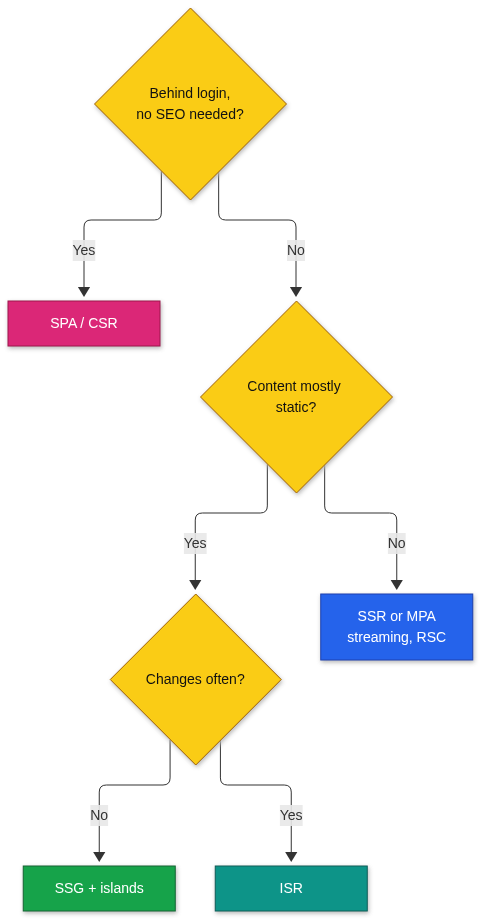
Rules of thumb:
Pick the simplest rendering model that meets your SEO and performance needs.
Organize by feature before reaching for layered or clean architecture.
Separate server state from client state early.
Reach for micro-frontends only when organizational problems, not technical ones, demand it.
Every pattern here trades simplicity for something else. Adopt one when you can name the specific pain it removes.
Further Reading
Published via ZyVOP — Write once in Markdown, auto-backup to GitHub, and syndicate to Dev.to, Medium & Hashnode in 1 click.
About the author
- One platform to write, cross-post to Dev.to, Medium, WordPress, Hashnode, and Bluesky, and protect your SEO with canonical links. Zero paywalls and full content ownership.
Comments
Join the discussionNo comments yet. Be the first to comment.