# Hardening the Edge: Defeating SSRF, Redirect Traps, and Compression Bombs in Next.js Dynamic OpenGraph Generators
Dynamic OpenGraph (OG) image generation is standard practice in modern web applications. Every blog post, product page, and user profile needs a crisp, auto-generated `1200x630` social preview image for Twitter cards and LinkedIn previews.
In Next.js, this is typically built using `ImageResponse` from `@vercel/og`, running in an Edge runtime or serverless function:
```typescript
// app/api/og/route.tsx (A typical, dangerously naive implementation)
import { ImageResponse } from 'next/og';
export const runtime = 'edge';
export async function GET(request: Request) {
const { searchParams } = new URL(request.url);
const title = searchParams.get('title') || 'Default Title';
const avatarUrl = searchParams.get('avatar'); // Untrusted user input
return new ImageResponse(
(
{title}
{avatarUrl && }
),
{ width: 1200, height: 630 }
);
}
```
This snippet looks innocent. It is also a **critical Server-Side Request Forgery (SSRF) vulnerability** deployed to production on thousands of websites.
When Satori (the rendering engine behind `ImageResponse`) encounters an external ``, it performs an out-of-band HTTP `fetch()` to retrieve that image **from inside your infrastructure**.
If you run this code, anyone on the internet can turn your Edge server into a blind proxy to probe internal networks, extract cloud provider credentials, or crash your workers with memory exhaustion.
Here is an analysis of how these attacks work in V8 Edge runtimes, why conventional backend security advice fails at the Edge, and how to build a resilient, multi-layer defense.
* * *
## 1\. The Anatomy of an Edge SSRF Attack
When you pass an untrusted URL parameter to server-side image fetching, attackers exploit three distinct attack vectors:
### Vector 1: Cloud Metadata Harvesting
If your Next.js application runs on AWS (ECS, Fargate, EC2), Google Cloud, or behind Kubernetes, the host environment has access to internal link-local metadata endpoints:
```text
GET /api/og?title=Test&avatar=http://169.254.169.254/latest/meta-data/iam/security-credentials/app-role
```
If the rendering engine parses the response as an image or embeds error output, temporary IAM security credentials, Kubernetes secrets, or container environment variables can be leaked directly into the generated image.
### Vector 2: Internal Subnet Reconnaissance
Even on platforms without cloud metadata (such as Vercel or Cloudflare Workers), internal microservices, private VPC endpoints, Docker bridge networks (`http://172.17.0.1:8080`), or internal Redis/Elasticsearch ports can be scanned.
By measuring response timing or observing HTTP status codes, an attacker maps your internal network topology without ever touching your perimeter firewall.
### Vector 3: Denial of Service via Streaming Bloat (Gzip Bombs & Slowloris)
An attacker points `avatar` to an endpoint that:
1. Returns `Transfer-Encoding: chunked` with no `Content-Length` header, continuously streaming gigabytes of zeroes until your worker runs out of memory.
2. Serves a recursive compression bomb (e.g., a 10MB compressed file that expands into 10GB of memory upon decompression).
3. Holds the connection open indefinitely with 1 byte sent every 10 seconds, exhausting your Edge concurrency limits.
* * *
## 2\. Why Conventional SSRF Protections Fail at the Edge
In a traditional Node.js/Express environment, the standard defense against SSRF is IP resolution checking:
```typescript
// Traditional Node.js defense: Resolve DNS and check if IP is private
import dns from 'node:dns/promises';
import ipaddr from 'ipaddr.js';
const { address } = await dns.lookup(targetHost);
const addr = ipaddr.parse(address);
if (addr.range() !== 'unicast') {
throw new Error('SSRF attempt blocked: Private IP');
}
```
In modern **V8 Edge Runtimes** (Next.js Edge Runtime, Cloudflare Workers, Vercel Edge Functions):
- **There is no** `node:dns` **module:** V8 isolates run on top of lightweight Web Standards APIs (`fetch`, `Request`, `Response`, `ReadableStream`). You cannot execute raw DNS lookups before initiating a connection.
- `fetch()` **abstracts the transport layer:** You cannot inspect the resolved IP address of the destination socket.
- **DNS Rebinding remains a threat:** An attacker can configure a domain (`attacker-domain.com`) whose DNS record has a TTL of 1 second. The first lookup resolves to a benign public IP (`1.1.1.1`), but during the second fetch, it resolves to `169.254.169.254`.
Because you cannot reliably inspect socket IPs at the Edge, **you must enforce strict cryptographic and origin constraints at the application layer**.
* * *
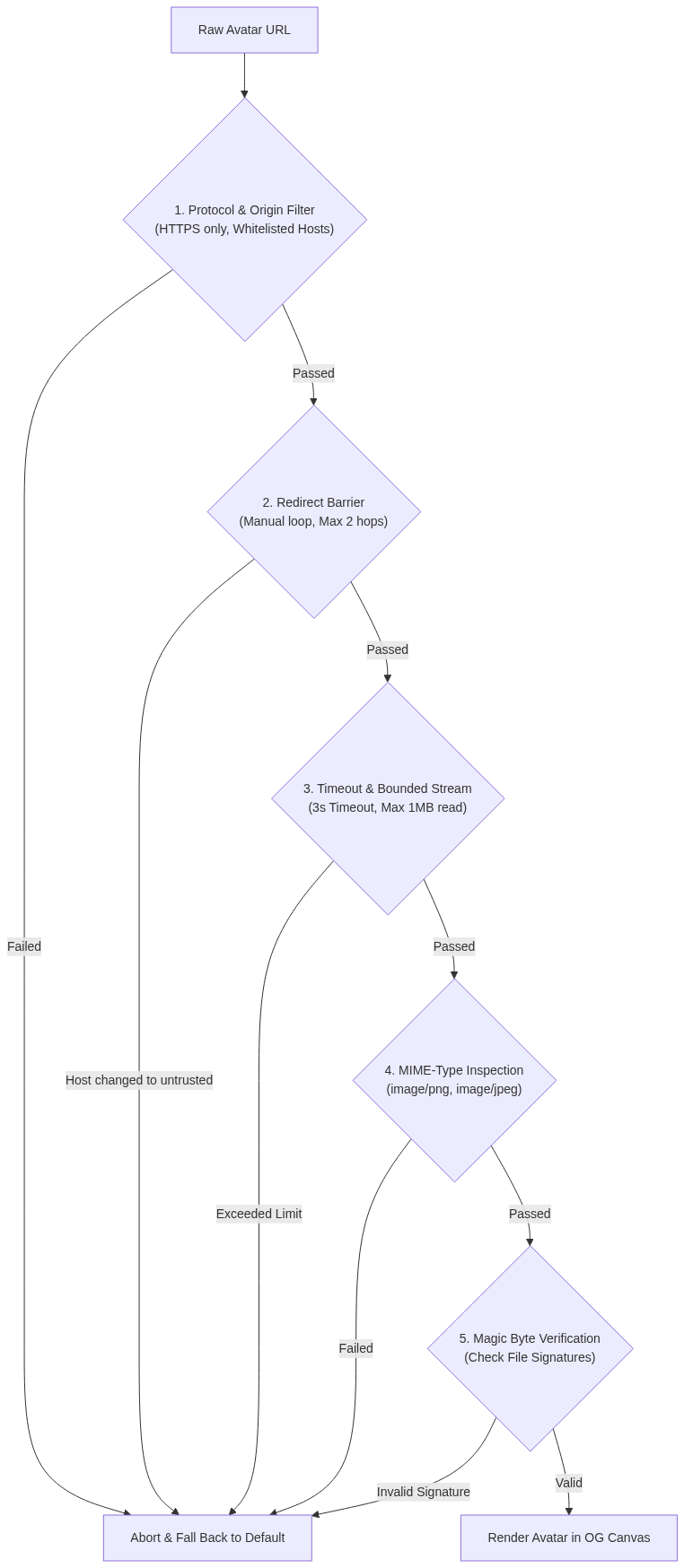
## 3\. The 5-Layer Defense Architecture
To secure dynamic image generation in Edge environments without relying on Node-specific networking APIs, we implement five distinct validation barriers:
* * *
## 4\. Production Implementation: The Safe Avatar Fetcher
Here is the complete, drop-in utility module implemented in TypeScript. It handles bounded streaming, magic byte verification, and redirect inspection.
### File: `lib/security/safe-avatar-fetcher.ts`
```typescript
/**
* Safe Image Fetcher for Edge Runtime (Next.js @vercel/og)
* Defends against SSRF, open redirect bypasses, chunked memory attacks, and polyglot files.
*/
const MAX_AVATAR_URL_LENGTH = 2_048;
const MAX_AVATAR_BYTES = 1_000_000; // 1 MB hard limit
const AVATAR_FETCH_TIMEOUT_MS = 3_000; // 3 seconds timeout
const MAX_AVATAR_REDIRECTS = 2;
// Explicitly whitelisted image hosts
const ALLOWED_AVATAR_HOSTS = new Set([
'avatars.githubusercontent.com',
'assets.example.com',
'storage.googleapis.com',
]);
// Allowed domain suffixes (e.g., Google OAuth profile pictures)
// Notice the leading dot to prevent prefix hijacking (e.g., evilgoogleusercontent.com)
const ALLOWED_AVATAR_HOST_SUFFIXES = ['.googleusercontent.com'];
// Permitted MIME types (strictly raster formats: PNG and JPEG)
const ALLOWED_CONTENT_TYPES = new Set(['image/jpeg', 'image/png']);
// Standard HTTP redirect status codes
const REDIRECT_STATUSES = new Set([301, 302, 303, 307, 308]);
/**
* Validates whether a given URL adheres to strict security constraints.
* Rejects non-HTTPS protocols, embedded credentials, custom ports, and unsupported formats.
*/
export function getSafeAvatarUrl(value: string): URL | null {
if (!value || value.length > MAX_AVATAR_URL_LENGTH) return null;
let url: URL;
try {
url = new URL(value);
} catch {
return null;
}
// 1. Strict Protocol Enforcement (blocks http:, file:, gopher:)
if (url.protocol !== 'https:') return null;
// 2. Reject credentials in URLs (e.g., https://admin:secret@host.com)
if (url.username || url.password) return null;
// 3. Reject custom ports (e.g., https://host.com:8080/image.png)
if (url.port) return null;
// 4. Reject WebP formats early (Satori / Resvg lacks native WebP decoding)
if (url.pathname.toLowerCase().endsWith('.webp')) return null;
const hostname = url.hostname.toLowerCase();
// 5. Host Whitelist Verification
// The dot-prefix check ensures "evilgoogleusercontent.com" is strictly blocked
const isAllowedHost =
ALLOWED_AVATAR_HOSTS.has(hostname) ||
ALLOWED_AVATAR_HOST_SUFFIXES.some(
(suffix) => hostname === suffix.slice(1) || hostname.endsWith(suffix)
);
return isAllowedHost ? url : null;
}
/**
* Validates raw bytes against known image file signatures (magic numbers).
* Prevents attackers from serving HTML/JSON/XML payloads disguised under image MIME types.
*/
function isSupportedImage(contentType: string, bytes: Uint8Array): boolean {
const mediaType = contentType.split(';', 1)[0]?.trim().toLowerCase();
if (!mediaType || !ALLOWED_CONTENT_TYPES.has(mediaType)) return false;
// PNG File Signature: \x89PNG\r\n\x1a\n
if (mediaType === 'image/png') {
const pngSignature = [0x89, 0x50, 0x4e, 0x47, 0x0d, 0x0a, 0x1a, 0x0a];
if (bytes.length < pngSignature.length) return false;
return pngSignature.every((byte, index) => bytes[index] === byte);
}
// JPEG File Signature: 0xFF 0xD8 0xFF
if (bytes.length < 3) return false;
return bytes[0] === 0xff && bytes[1] === 0xd8 && bytes[2] === 0xff;
}
/**
* Reads a response body stream with a strict byte limit.
* Cancels the reader immediately if the response exceeds MAX_AVATAR_BYTES,
* even when Content-Length is omitted (Chunked Transfer Encoding).
*/
async function readLimitedBody(response: Response): Promise {
const contentLength = response.headers.get('content-length');
if (contentLength) {
const declaredBytes = Number(contentLength);
if (!Number.isSafeInteger(declaredBytes) || declaredBytes < 0 || declaredBytes > MAX_AVATAR_BYTES) {
return null;
}
}
if (!response.body) return null;
const reader = response.body.getReader();
const chunks: Uint8Array[] = [];
let totalBytes = 0;
try {
while (true) {
const { done, value } = await reader.read();
if (done) break;
if (!value) continue;
totalBytes += value.byteLength;
if (totalBytes > MAX_AVATAR_BYTES) {
// Abort the underlying TCP connection immediately
await reader.cancel();
return null;
}
chunks.push(value);
}
} finally {
reader.releaseLock();
}
if (totalBytes === 0) return null;
// Assemble chunks into a contiguous Uint8Array
const bytes = new Uint8Array(totalBytes);
let offset = 0;
for (const chunk of chunks) {
bytes.set(chunk, offset);
offset += chunk.byteLength;
}
return bytes;
}
/**
* Safely fetches an external avatar with redirect boundaries and magic byte validation.
* Returns an ArrayBuffer suitable for Satori / ImageResponse, or undefined on any validation failure.
*/
export async function fetchSafeAvatar(
rawUrl: string,
fetchImpl: typeof fetch = fetch,
): Promise<{ buffer: ArrayBuffer; mimeType: 'image/png' | 'image/jpeg' } | undefined> {
let currentUrl = getSafeAvatarUrl(rawUrl);
if (!currentUrl) return undefined;
const controller = new AbortController();
const timeout = setTimeout(() => controller.abort(), AVATAR_FETCH_TIMEOUT_MS);
try {
for (let redirectCount = 0; redirectCount <= MAX_AVATAR_REDIRECTS; redirectCount += 1) {
const response = await fetchImpl(currentUrl, {
cache: 'force-cache',
redirect: 'manual', // CRITICAL: Never follow redirects automatically
signal: controller.signal,
headers: {
'User-Agent': 'Mozilla/5.0 (compatible; ImageProxy/1.0)',
Accept: 'image/jpeg, image/png',
},
});
// Handle redirects manually to re-verify the destination host
if (REDIRECT_STATUSES.has(response.status)) {
if (redirectCount === MAX_AVATAR_REDIRECTS) return undefined;
const location = response.headers.get('location');
if (!location) return undefined;
// Resolve relative redirects safely against current URL
currentUrl = getSafeAvatarUrl(new URL(location, currentUrl).toString());
if (!currentUrl) return undefined; // Destination failed whitelist
continue;
}
if (!response.ok) return undefined;
// Stream body with strict size boundary
const bytes = await readLimitedBody(response);
if (!bytes) return undefined;
// Verify file signature magic bytes
const contentType = response.headers.get('content-type') || '';
if (!isSupportedImage(contentType, bytes)) {
return undefined;
}
// Infer verified MIME type directly from magic bytes
const isPng = bytes[0] === 0x89 && bytes[1] === 0x50 && bytes[2] === 0x4e && bytes[3] === 0x47;
const mimeType = isPng ? 'image/png' : 'image/jpeg';
return {
buffer: bytes.buffer as ArrayBuffer,
mimeType,
};
}
} catch {
// Fail closed: Any network timeout, DNS error, or abort returns undefined
return undefined;
} finally {
clearTimeout(timeout);
}
return undefined;
}
```
* * *
## 5\. Integrating with Next.js `ImageResponse`
In your OpenGraph route handler, consume `fetchSafeAvatar` and always provide a graceful fallback (such as the author's initials) when the remote image fails validation.
We also implement a universal Base64 helper that works across both standard Node.js environments and pure Edge V8 isolates (Cloudflare Workers, Deno, Vercel Edge).
### File: `app/api/og/route.tsx`
```typescript
import { ImageResponse } from 'next/og';
import { fetchSafeAvatar } from '@/lib/security/safe-avatar-fetcher';
export const runtime = 'edge';
/**
* Universal Base64 encoder for ArrayBuffers that operates seamlessly
* in both Node.js (Buffer) and pure V8 Edge isolates (btoa).
*/
function toBase64DataUrl(bytes: Uint8Array, mimeType: string): string {
if (typeof Buffer !== 'undefined') {
return `data:${mimeType};base64,${Buffer.from(bytes).toString('base64')}`;
}
let binary = '';
for (let i = 0; i < bytes.byteLength; i += 1) {
binary += String.fromCharCode(bytes[i]);
}
return `data:${mimeType};base64,${btoa(binary)}`;
}
export async function GET(request: Request) {
const { searchParams } = new URL(request.url);
const title = searchParams.get('title') || 'Engineering Post';
const authorName = searchParams.get('author') || 'Anonymous';
const rawAvatarUrl = searchParams.get('avatar');
// Fetch remote avatar safely; returns undefined if anything fails
const avatarResult = rawAvatarUrl ? await fetchSafeAvatar(rawAvatarUrl) : undefined;
// Convert verified buffer to Base64 data URL with matching MIME type
const avatarDataUrl = avatarResult
? toBase64DataUrl(new Uint8Array(avatarResult.buffer), avatarResult.mimeType)
: null;
return new ImageResponse(
(
),
{
width: 1200,
height: 630,
}
);
}
```
* * *
## 6\. Deep Dive into the Defense Mechanics
### A. The Manual Redirect Trap (`redirect: 'manual'`)
By default, the Fetch standard automatically follows HTTP 301/302 redirects. This is where most naive SSRF filters crumble.
An attacker registers a URL on an allowed host:
```text
https://assets.example.com/user/redirect?url=http://169.254.169.254/latest/meta-data/
```
If you rely on auto-redirects, your initial check passes `assets.example.com`, but the underlying HTTP client seamlessly requests the AWS metadata endpoint.
By setting `redirect: 'manual'`, the fetcher intercepts the redirect response, reads the `Location` header, and passes the target URL back through `getSafeAvatarUrl()`. If the redirect points to an internal IP, an unapproved origin, or non-HTTPS protocol, the chain terminates immediately.
### B. Defeating Chunked Compression Bombs (`readLimitedBody`)
Checking `response.headers.get('content-length')` is not enough. HTTP servers can legally omit `Content-Length` and stream infinite data using `Transfer-Encoding: chunked`.
Our implementation reads the body chunk-by-chunk via the `ReadableStreamDefaultReader`:
```typescript
totalBytes += value.byteLength;
if (totalBytes > MAX_AVATAR_BYTES) {
await reader.cancel();
return null;
}
```
If the payload exceeds 1MB at any point during transmission, the reader is cancelled, tearing down the TCP connection without buffering the remainder into RAM.
### C. File Signature Verification (Magic Bytes)
Content-Type headers are client-controlled metadata. An attacker can serve an internal JSON file or HTML document with `Content-Type: image/png`.
We inspect the first 8 bytes of the binary buffer:
- **PNG Magic Bytes:** `0x89 0x50 0x4E 0x47 0x0D 0x0A 0x1A 0x0A` (`\x89PNG\r\n\x1a\n`)
- **JPEG SOI Marker:** `0xFF 0xD8 0xFF`
If the bytes do not match the declared image format, the payload is rejected before reaching the Satori parser.
### D. Why We Disallow SVG and WebP
1. **No SVG (**`image/svg+xml`**):** SVG is an XML-based vector format. Parsing untrusted SVGs exposes your application to XML External Entity (XXE) attacks, XML Entity Expansion (Billion Laughs denial-of-service), and embedded HTML payloads. By restricting avatars strictly to raster PNG and JPEG formats, entire classes of XML parser vulnerabilities are avoided.
2. **No WebP:** `@vercel/og` uses Satori paired with a WebAssembly build of Resvg. As of current versions, Satori does not bundle WebP decoders. Passing WebP assets results in Wasm panics or black rectangle placeholders. Filtering `.webp` early saves unnecessary network roundtrips.
### E. The Dot-Prefix Suffix Security Nuance
When validating wildcard domains, naive regexes or substring checks frequently introduce suffix confusion vulnerabilities:
```typescript
// INSECURE: Allows "evilgoogleusercontent.com"
hostname.endsWith('googleusercontent.com');
// SECURE: Enforces dot boundary or exact apex match
ALLOWED_AVATAR_HOST_SUFFIXES.some(
(suffix) => hostname === suffix.slice(1) || hostname.endsWith(suffix)
);
```
By enforcing the leading dot (`.googleusercontent.com`), an attacker cannot bypass the filter by registering arbitrary domains that simply end with the provider name.
* * *
## 7\. Defense-in-Depth Checklist
Before deploying any dynamic image route to production, verify these six requirements:
1. **Strict Protocol & Port Restrictions:** Never allow `http:`, `file:`, or non-standard ports (`:8080`, `:9000`).
2. **Explicit Host Whitelisting with Dot Boundaries:** Never accept arbitrary hosts from query parameters. Only allow your trusted CDN or verified OAuth avatar providers.
3. **Manual Redirect Inspection:** Set `redirect: 'manual'` and re-evaluate every hop through your whitelist.
4. **Stream Byte Bounding:** Cap incoming data at 1MB to prevent memory exhaustion and DoS from chunked transfer payloads.
5. **Magic Byte Verification:** Always inspect the actual file signature bytes, not just the HTTP `Content-Type` header.
6. **Raster-Only Media Constraints:** Completely reject SVGs to eliminate XML parsing and XXE vectors.
By treating every external URL as potentially hostile, you protect your internal infrastructure, ensure consistent Edge rendering performance, and eliminate SSRF vulnerabilities at the network perimeter.
---
*Published via [ZyVOP](https://zyvop.com/hardening-the-edge-defeating-ssrf-redirect-traps-and-compression-bombs-in-next-js-dynamic-opengraph-generators-qkum9?utm_source=hashnode&utm_medium=crosspost&utm_campaign=syndication) — Write once in Markdown, auto-backup to GitHub, and syndicate to Dev.to, Medium & Hashnode in 1 click.*