
If you’ve run a cache, a session store, or a rate limiter in the last decade, you’ve probably used Redis. In 2024 the ground shifted under that default, and the project that came out of it, Valkey, has been busy ever since. This post covers where Valkey came from, how it differs from Redis today, what shipped in the 9.x line, and how to try it or move to it without drama.
What Valkey is
Valkey is an open-source, BSD-licensed, in-memory key/value datastore. It speaks the same wire protocol as Redis, supports the familiar core data types (strings, hashes, lists, sets, sorted sets, streams and more), and runs either as a single daemon or as a cluster with replication and failover. Teams use it for caching, session storage, queues, leaderboards and pub/sub, and, for some latency-sensitive workloads, as a primary database.
It is hosted by the Linux Foundation. That matters less for the code than for the governance: no single company owns the roadmap.
Why it exists
In March 2024, Redis moved from its long-standing BSD license to a dual source-available model (RSALv2 and SSPLv1), starting with Redis 7.4. About a week later, the Linux Foundation announced Valkey, a fork of the last BSD-licensed code (Redis 7.2.4), backed by contributors and companies including AWS, Google Cloud and Oracle.
The licensing picture has since softened: Redis added AGPLv3 as an option with Redis 8. But by then the fork had a life of its own, with a regular release cadence and a broad contributor base.
The release line at a glance
Valkey typically ships one stable major version a year, with minor releases in between.
| Version | Released | Headline |
|---|---|---|
| 8.0 | September 2024 | First major release after the fork; reworked I/O threading for higher throughput |
| 8.1 | April 2025 | Memory-efficiency work, including a new hash table implementation |
| 9.0 | October 2025 | Hash field expiration, atomic slot migration, numbered databases in cluster mode |
| 9.1 | May 2026 | Database-level ACLs, JSON logs, new commands, a faster I/O threading model |
What 9.0 brought
Hash field expiration. Until recently, TTLs applied to whole keys. With 9.0 you can expire individual fields inside a hash, which is a natural fit for session data, feature flags and per-user caches where different attributes should age out at different times.
Atomic slot migration. Resharding a cluster used to move keys one at a time, which meant redirects, retries and room for partial failures. It streams the whole slot to the target node and then hands it over in one step, so scaling operations are more predictable.
Numbered databases in cluster mode. Cluster deployments can now use multiple logical databases, which removes a common blocker when consolidating workloads onto a cluster.
9.0 also brought performance and scalability work: in the project’s own test, a 2,000-node cluster sustained over a billion write requests (SETs) per second (benchmark write-up). As always, treat benchmark figures as an upper bound for tuned setups, not a promise for yours.
What 9.1 added
Valkey 9.1.0 landed on 19 May 2026 with contributions from more than eighty people. The highlights:
Security. A new database-level ACL system lets administrators restrict users to specific numbered databases, giving finer-grained multi-tenant isolation inside a single instance, and TLS certificates can now be reloaded automatically. The Lua scripting engine also moved into a separate module, so administrators who don’t use scripting can disable it and shrink the attack surface.
Observability. New metrics for main-thread and I/O-thread usage give a truer picture of server load. This addresses the common confusion where CPU looks high because threads are busy-waiting for work. The server can also emit logs as JSON, so they drop straight into your observability platform without custom parsing.
Performance. A redesigned I/O threading communication model improves throughput by up to 17% on a range of workloads, and the project reports up to 2.1 million requests per second on a single server, measured with 512-byte payloads, 9 I/O threads and a pipeline depth of 10 commands (benchmark details).
Memory efficiency. Internal pointer optimizations can cut memory use by up to 20% for strings under 128 bytes, and skiplist changes reduce sorted set memory by up to 10%.
New commands.
HGETDELatomically reads and deletes hash fields,MSETEXsets multiple keys with a shared expiration in one call, andCLUSTERSCANscans keys across a whole cluster.Faster replica creation. With AOF (the append-only file that logs every write) enabled, a new replica reuses the RDB file (a point-in-time snapshot) it received instead of generating a fresh snapshot for the initial AOF base file.
Patch releases have kept coming since. The most recent I found, 9.1.2 (1 September 2026), is a security release.
Valkey and Redis today
For a long time the answer to “is it compatible?” was simply yes. That’s still true for the common path: if your application sticks to core commands, the same clients and tools generally work. But the two projects have been diverging since the fork, and the gap grows with each release.
Compatibility. Valkey is compatible with Redis OSS 7.2 and earlier, and can load their RDB and AOF files directly (migration guide). Redis Community Edition 7.4 and later writes data files Valkey cannot read, and each project has added features the other lacks, so check what your application depends on.
Beyond the core. Redis 8 bundles additional data types and a query engine. Valkey takes a more modular route, with extensions such as Valkey Search developed as modules. Search 1.2, announced in March 2026, added full-text search and aggregations.
Clients and tooling. Redis-compatible clients mostly keep working, and Valkey-specific options exist too, including the Valkey GLIDE client library and Valkey Admin, an open-source visual cluster management tool.
Where to run it. Amazon ElastiCache, Google Cloud Memorystore for Valkey (9.0 became generally available there in March 2026) and Heroku Key-Value Store (Valkey 9 GA in August 2026) all offer managed Valkey.
Try it in five minutes
Start a local container and open the CLI. This is a learning setup, not a production deployment:
docker run -d --name valkey -p 6379:6379 valkey/valkey:9.1.2
docker exec -it valkey valkey-cli
Then try hash field expiration:
127.0.0.1:6379> HSET session:42 user alice theme dark
(integer) 2
127.0.0.1:6379> HEXPIRE session:42 3600 FIELDS 1 theme
1) (integer) 1
127.0.0.1:6379> HTTL session:42 FIELDS 1 theme
1) (integer) 3600
The theme field will vanish after an hour while user stays put (HTTL counts down, so expect a number just under 3600). From Python, the valkey package mirrors the familiar redis-py interface:
import valkey

r = valkey.Valkey(host='localhost', port=6379, decode_responses=True)
r.set('greeting', 'hello from Valkey', ex=60)
print(r.get('greeting'))
Moving from Redis
A careful migration looks roughly like this:
Take inventory. Run
INFO commandstatson your current instance to see which commands your application really uses, and list any modules you depend on.Check your clients. Most Redis clients work as-is, but confirm the versions you run and test them against Valkey in staging.
Replicate, if your source version supports it. If you’re on Redis OSS 7.2 or earlier, you can configure Valkey as a replica with
REPLICAOFand let it catch up before switching traffic. Redis Community Edition 7.4 and later writes RDB and AOF files that Valkey cannot load, and a replica sync transfers data as an RDB, so do not assume this route works. For those versions, plan a logical migration (a tool that copies keys over the wire) or dual writes, and rehearse the cutover in staging. Valkey’s official migration guide covers Redis 7.2 and earlier.Cut over gradually. Shift a slice of traffic first, watch latency and memory, and keep the old instance around for rollback.
Pin and patch. Pin a specific Valkey version in your deployment, and subscribe to release notes so security patches don’t go unnoticed.
Here is the cutover in three stages:
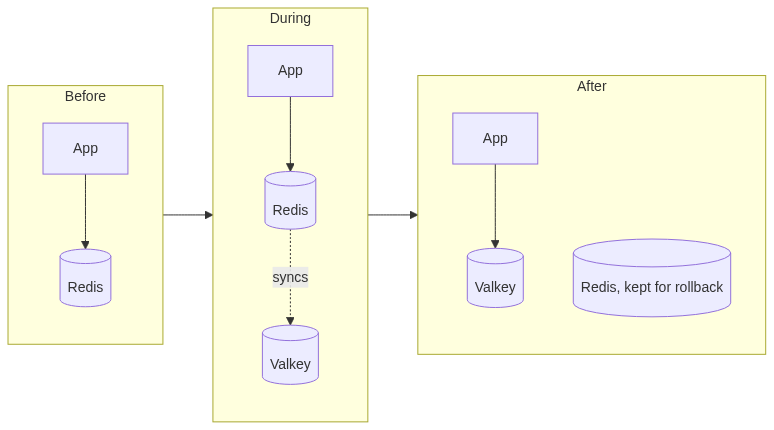
The app keeps talking to Redis until Valkey has caught up. The diagram assumes a source on Redis OSS 7.2 or earlier; on newer versions, replace the sync step with a logical migration or dual writes.
Should you switch?
Valkey is a strong choice if you want a permissive BSD license, vendor-neutral governance, or you’re already on a cloud provider that offers it as a managed service. It’s also attractive if your workload is mostly caching, sessions and queues, where the core feature set is what matters.
Staying put makes more sense if you rely on Redis-specific data types or query features that Valkey doesn’t offer in the same form, or if your vendor support contract is tied to Redis. In either case, a short staging test against your real command mix will tell you more than any comparison article, this one included.
Sources and further reading
Published via ZyVOP — Write once in Markdown, auto-backup to GitHub, and syndicate to Dev.to, Medium & Hashnode in 1 click.
About the author
- One platform to write, cross-post to Dev.to, Medium, WordPress, Hashnode, and Bluesky, and protect your SEO with canonical links. Zero paywalls and full content ownership.
Comments
Join the discussionNo comments yet. Be the first to comment.