
Building a Production Remote MCP Server in NestJS: Connecting Claude Desktop and Cursor to Your SaaS
Why local stdio scripts fail in production, and how to build a stateless JSON-RPC 2.0 server over HTTP with bearer authentication, schema validation, and self-healing LLM error handling.
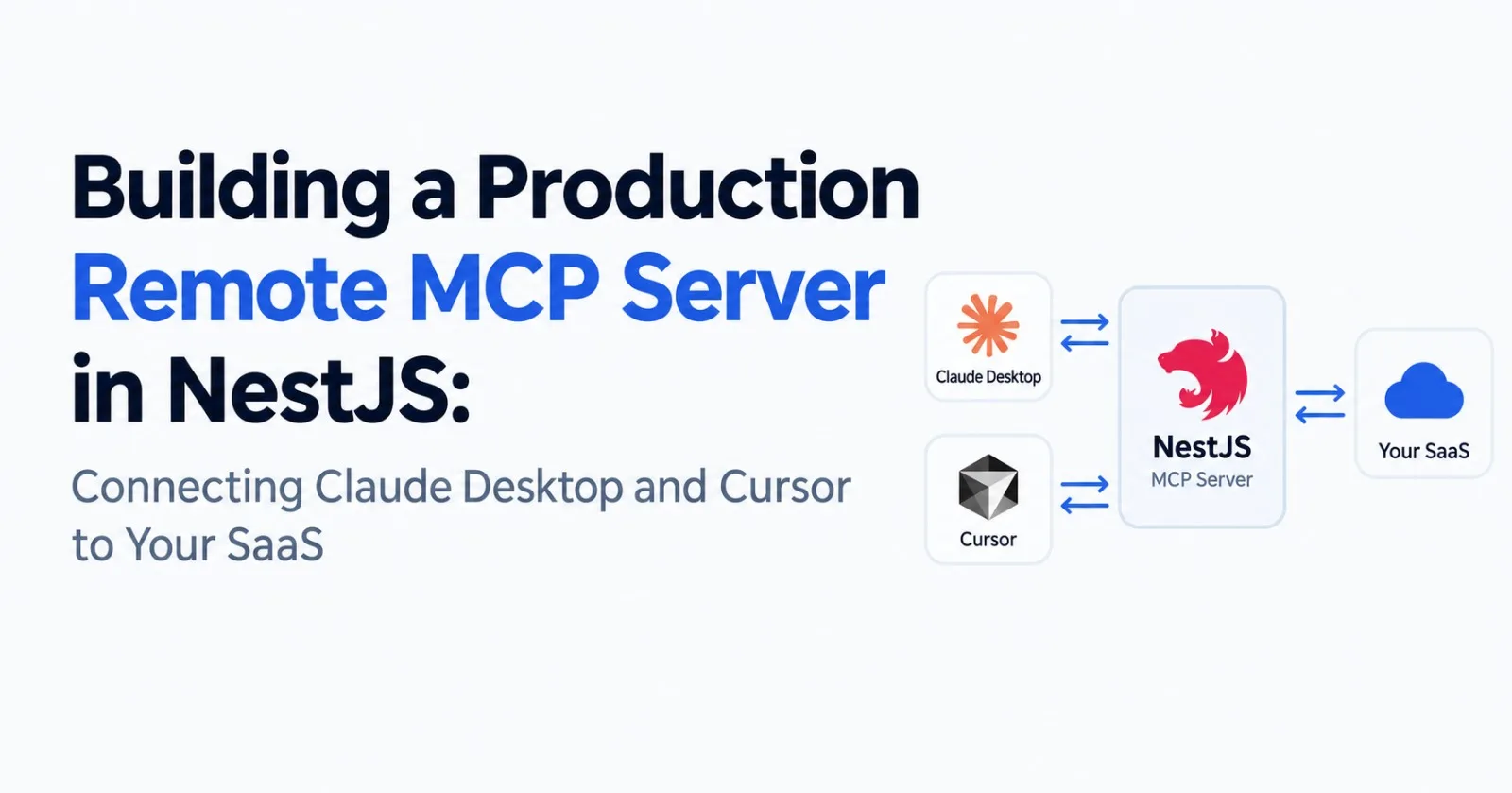
Anthropic's Model Context Protocol (MCP) has rapidly become the open standard for connecting AI coding assistants (like Cursor and Claude Desktop) to external data sources and developer tools.
If you read the official tutorials, however, almost every example shows a single Python or Node script communicating over standard input/output (stdio):
{
  "mcpServers": {
    "my-tool": {
      "command": "node",
      "args": ["/path/to/local-server/index.js"]
    }
  }
}
Running MCP over stdio is fine for local developer utilities running on your laptop. But if you are building an actual web application, content platform, or multi-tenant SaaS, stdio is an architectural non-starter:
You cannot give your end users arbitrary shell access to your production infrastructure.
Local scripts cannot safely authenticate against your database without baking shared database credentials into client configuration files.
You have no mechanism for centralized rate limiting, audit logging, multi-tenant isolation, or token revocation.
To connect your SaaS backend to Cursor and Claude Desktop, you must build a Remote MCP Server operating over HTTP using the JSON-RPC 2.0 specification.
This guide demonstrates how to build a production-grade, authenticated Remote MCP server inside a NestJS application, complete with protocol version negotiation, JSON Schema tool declarations, bearer token authentication, and the crucial distinction between JSON-RPC protocol errors and LLM-recoverable tool failures.
1. How Remote MCP Works Over HTTP
MCP operates on top of JSON-RPC 2.0. When an AI client like Claude Desktop or Cursor connects to a remote server, it executes a standardized lifecycle over HTTP POST:
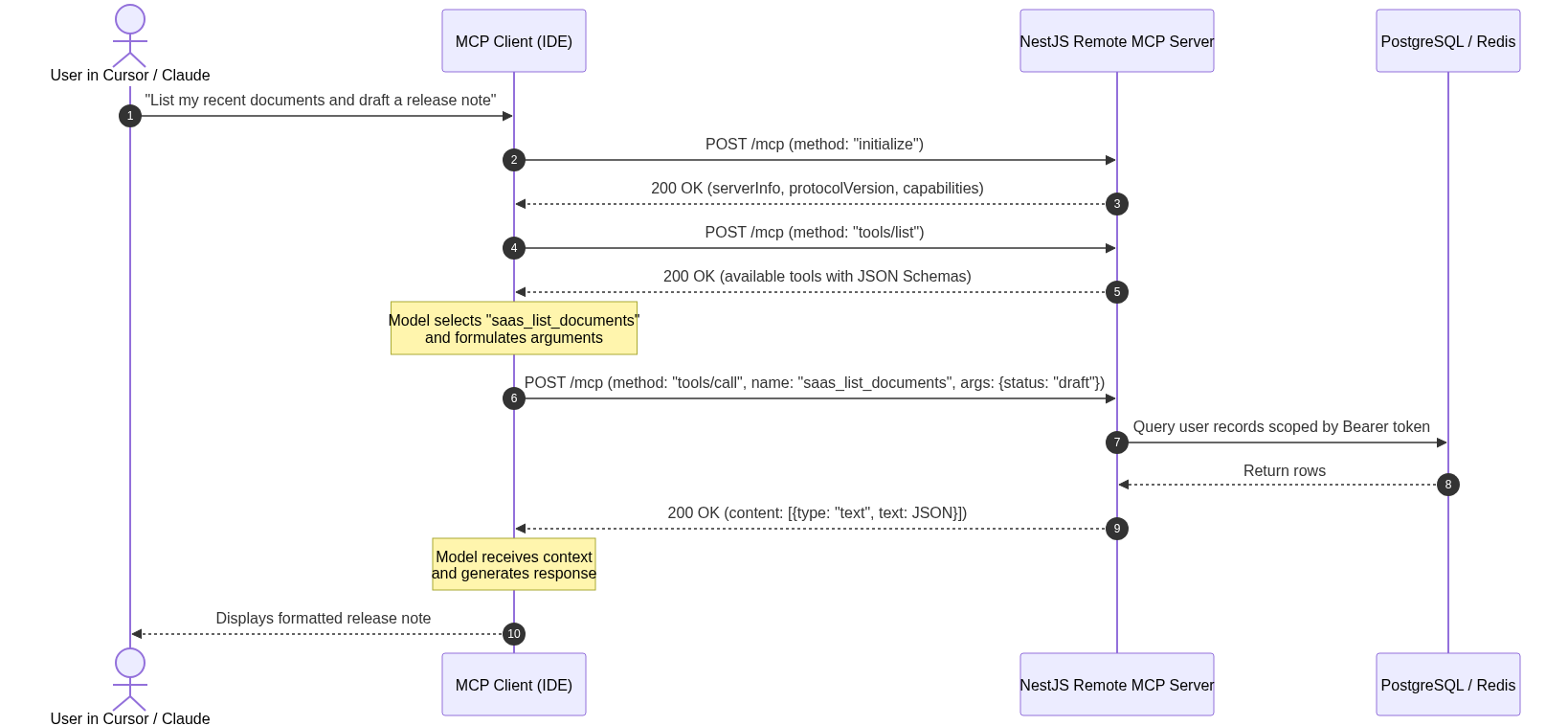
The Lifecycle Steps:
Handshake (
initialize): The client sends its supported protocol versions and capabilities. The server negotiates the version and returns its metadata and tool capabilities.Discovery (
tools/list): The client requests all available tools. The server returns an array of tool objects, each with a strict JSON Schema defining parameter types, defaults, and descriptions.Execution (
tools/call): When the AI decides to invoke a tool, it issues a request containing the tool name and validated arguments. The server executes the business logic and returns formatted text or structured data.
2. Defining the Protocol Interfaces & Schemas
Let's begin by defining the core JSON-RPC 2.0 and MCP data contracts.
Create a shared protocol definition file: src/modules/mcp/mcp-protocol.ts.
// src/modules/mcp/mcp-protocol.ts

export const MCP_PROTOCOL_VERSION = '2025-11-25';
export const MCP_SUPPORTED_PROTOCOL_VERSIONS = [
  MCP_PROTOCOL_VERSION,
  '2025-06-18',
  '2025-03-26',
] as const;

export interface McpRequest {
  jsonrpc: '2.0';
  id?: string | number | null;
  method: string;
  params?: Record<string, unknown>;
}

export interface McpToolDefinition {
  name: string;
  title: string;
  description: string;
  inputSchema: Record<string, unknown>;
  annotations?: {
    readOnlyHint?: boolean;
    destructiveHint?: boolean;
    idempotentHint?: boolean;
  };
}

export interface McpSuccessResponse {
  jsonrpc: '2.0';
  id: string | number | null;
  result: Record<string, unknown>;
}

export interface McpErrorResponse {
  jsonrpc: '2.0';
  id: string | number | null;
  error: {
    code: number;
    message: string;
    data?: unknown;
  };
}

export function isMcpRequest(payload: unknown): payload is McpRequest {
  if (!payload || typeof payload !== 'object') return false;
  const req = payload as Record<string, unknown>;
  return req.jsonrpc === '2.0' && typeof req.method === 'string';
}

export function mcpSuccess(id: string | number | null, result: Record<string, unknown>): McpSuccessResponse {
  return { jsonrpc: '2.0', id, result };
}

export function mcpError(
  id: string | number | null,
  code: number,
  message: string,
  data?: unknown
): McpErrorResponse {
  return {
    jsonrpc: '2.0',
    id,
    error: { code, message, ...(data !== undefined ? { data } : {}) },
  };
}

/**
 * Formats a tool response for the MCP specification.
 * Notice: tool errors return a successful JSON-RPC envelope with `isError: true`!
 */
export function mcpToolResult(data: unknown, isError = false) {
  const serialized = typeof data === 'string' ? data : JSON.stringify(data, null, 2);
  return {
    content: [{ type: 'text', text: serialized }],
    ...(isError ? { isError: true } : {}),
  };
}

export function negotiateMcpProtocolVersion(requested?: unknown): string {
  if (typeof requested === 'string' && (MCP_SUPPORTED_PROTOCOL_VERSIONS as readonly string[]).includes(requested)) {
    return requested;
  }
  return MCP_PROTOCOL_VERSION;
}
3. Registering Production Tool Schemas
AI models rely directly on your JSON Schema definitions to understand what parameters exist, what format they require, and how to self-correct invalid inputs.
In the same protocol file or a dedicated registry, define your application's tools with clear descriptions and Anthropic Safety Annotations:
// src/modules/mcp/mcp-tools.ts
import { McpToolDefinition } from './mcp-protocol';

export const MCP_TOOLS: McpToolDefinition[] = [
  {
    name: 'saas_list_documents',
    title: 'List Documents',
    description: 'Fetch a paginated list of documents owned by the authenticated user.',
    inputSchema: {
      type: 'object',
      properties: {
        status: {
          type: 'string',
          enum: ['DRAFT', 'PUBLISHED', 'ARCHIVED'],
          description: 'Filter documents by current status.',
        },
        limit: {
          type: 'integer',
          minimum: 1,
          maximum: 50,
          default: 20,
          description: 'Number of records to return.',
        },
        offset: {
          type: 'integer',
          minimum: 0,
          default: 0,
          description: 'Pagination offset.',
        },
      },
      additionalProperties: false,
    },
    // Safety annotations tell the agent whether confirmation is needed
    annotations: { readOnlyHint: true, destructiveHint: false, idempotentHint: true },
  },
  {
    name: 'saas_create_document',
    title: 'Create Document',
    description: 'Create a new document draft or publish it immediately.',
    inputSchema: {
      type: 'object',
      properties: {
        title: {
          type: 'string',
          minLength: 3,
          maxLength: 200,
          description: 'The title of the document.',
        },
        content: {
          type: 'string',
          minLength: 1,
          description: 'The full document body in Markdown.',
        },
        status: {
          type: 'string',
          enum: ['DRAFT', 'PUBLISHED'],
          default: 'DRAFT',
        },
        tags: {
          type: 'array',
          maxItems: 10,
          items: { type: 'string', maxLength: 30 },
          description: 'Category or topic tags.',
        },
      },
      required: ['title', 'content'],
      additionalProperties: false,
    },
    annotations: { readOnlyHint: false, destructiveHint: false, idempotentHint: false },
  },
  {
    name: 'saas_get_analytics',
    title: 'Get User Analytics',
    description: 'Retrieve view counts, engagement stats, and metrics for the user account.',
    inputSchema: {
      type: 'object',
      properties: {
        period: {
          type: 'string',
          enum: ['7d', '30d', '90d'],
          default: '30d',
          description: 'Analytics aggregation window.',
        },
      },
      additionalProperties: false,
    },
    annotations: { readOnlyHint: true, destructiveHint: false, idempotentHint: true },
  },
];
Why Annotations Matter
The annotations block provides runtime guidance to the host client:
readOnlyHint: true: The client knows this tool only reads data and doesn't mutate state.destructiveHint: true: Prompts the AI client to require explicit user confirmation before executing (e.g., deleting a database or purging a repository).idempotentHint: true: Informs the client that re-running the tool with identical arguments produces identical state.
4. The Critical Difference: Protocol Errors vs Tool Errors
Here is the single most common mistake backend developers make when building an MCP server:
Do not return an HTTP 400/500 or JSON-RPC error when a tool fails.
Consider what happens if an LLM calls saas_create_document with an invalid title:
❌ WRONG (Client Crash):
HTTP 200 / 400
{ "jsonrpc": "2.0", "id": 1, "error": { "code": -32602, "message": "Title must be at least 3 characters" } }
When an MCP client (like Claude Desktop) receives a JSON-RPC level error, it treats the entire protocol communication as broken and throws an exception. The user sees a red error box, and the agent session halts.
✅ RIGHT (LLM Self-Correction):
HTTP 200 OK
{
  "jsonrpc": "2.0",
  "id": 1,
  "result": {
    "content": [
      {
        "type": "text",
        "text": "{\"error\":\"Validation failed: Title must be at least 3 characters long.\"}"
      }
    ],
    "isError": true
  }
}
When you return a successful JSON-RPC envelope with isError: true inside the result, the MCP host feeds the error message directly back into the LLM's context window.
The LLM immediately sees: "Oh, my title was too short. Let me generate a longer title and try again." The agent self-corrects and continues the workflow seamlessly.
5. Implementing the NestJS Controller
The controller manages HTTP transports, enforces bearer token authentication, handles CORS origins, negotiates protocol versions, and maps incoming JSON-RPC methods.
Create: src/modules/mcp/mcp.controller.ts.
// src/modules/mcp/mcp.controller.ts
import {
  Body,
  Controller,
  Get,
  Headers,
  HttpException,
  HttpStatus,
  Logger,
  Post,
  Req,
  Res,
  UseGuards,
} from '@nestjs/common';
import { FastifyReply, FastifyRequest } from 'fastify';
import { AuthService } from '../auth/auth.service';
import { McpService } from './mcp.service';
import { MCP_TOOLS } from './mcp-tools';
import {
  isMcpRequest,
  MCP_SUPPORTED_PROTOCOL_VERSIONS,
  mcpError,
  mcpSuccess,
  mcpToolResult,
  negotiateMcpProtocolVersion,
} from './mcp-protocol';

@Controller('mcp')
export class McpController {
  private readonly logger = new Logger(McpController.name);

  constructor(
    private readonly authService: AuthService,
    private readonly mcpService: McpService,
  ) {}

  @Get()
  get(@Res() reply: FastifyReply) {
    return reply
      .header('Allow', 'POST')
      .status(HttpStatus.METHOD_NOT_ALLOWED)
      .send({ message: 'Remote MCP servers accept JSON-RPC 2.0 requests over HTTP POST.' });
  }

  @Post()
  async handleMcp(
    @Req() request: FastifyRequest,
    @Res() reply: FastifyReply,
    @Headers('authorization') authorization: string | undefined,
    @Body() body: unknown,
  ) {
    reply.header('Cache-Control', 'no-store');

    // 1. Validate Protocol Version Header (if provided by client)
    const protocolHeader = request.headers['mcp-protocol-version'];
    if (
      protocolHeader &&
      (typeof protocolHeader !== 'string' ||
        !(MCP_SUPPORTED_PROTOCOL_VERSIONS as readonly string[]).includes(protocolHeader))
    ) {
      return reply.status(HttpStatus.BAD_REQUEST).send(
        mcpError(null, -32602, 'Unsupported MCP protocol version', {
          supported: MCP_SUPPORTED_PROTOCOL_VERSIONS,
        }),
      );
    }

    // 2. Enforce Bearer Token Authentication
    const token = this.extractBearerToken(authorization);
    const user = token ? await this.authService.validateApiKey(token) : null;
    if (!user) {
      return reply
        .header('WWW-Authenticate', 'Bearer realm="SaaS Remote MCP"')
        .status(HttpStatus.UNAUTHORIZED)
        .send(mcpError(null, -32001, 'Unauthorized: Invalid or missing API key'));
    }

    // 3. Verify JSON-RPC Envelope
    if (!isMcpRequest(body)) {
      return reply.status(HttpStatus.BAD_REQUEST).send(mcpError(null, -32600, 'Invalid Request'));
    }

    // If client sends a notification (no id), acknowledge with 202
    if (body.id === undefined) {
      return reply.status(HttpStatus.ACCEPTED).send();
    }

    // 4. Route JSON-RPC Methods
    try {
      switch (body.method) {
        case 'initialize':
          return reply.send(
            mcpSuccess(body.id, {
              protocolVersion: negotiateMcpProtocolVersion(body.params?.protocolVersion),
              capabilities: {
                tools: { listChanged: false },
              },
              serverInfo: {
                name: 'acme-saas-mcp',
                title: 'Acme SaaS MCP Server',
                version: '1.0.0',
                description: 'Manage documents and view analytics directly from your AI agent.',
              },
              instructions: 'Always ask user confirmation before publishing or deleting documents.',
            }),
          );

        case 'ping':
          return reply.send(mcpSuccess(body.id, {}));

        case 'tools/list':
          return reply.send(mcpSuccess(body.id, { tools: MCP_TOOLS }));

        case 'tools/call': {
          const toolName = body.params?.name;
          if (typeof toolName !== 'string') {
            return reply.send(mcpError(body.id, -32602, 'tools/call requires a valid tool name'));
          }

          try {
            // Execute business logic scoped to the authenticated user
            const result = await this.mcpService.executeTool(
              user,
              toolName,
              body.params?.arguments,
            );
            return reply.send(mcpSuccess(body.id, mcpToolResult(result)));
          } catch (toolError) {
            // Convert known client validation errors into self-healing feedback
            const isClientError =
              toolError instanceof HttpException &&
              toolError.getStatus() >= 400 &&
              toolError.getStatus() < 500;

            const errorMessage = isClientError
              ? toolError.message
              : 'Internal error executing tool.';

            if (!isClientError) {
              this.logger.error(`MCP tool ${toolName} threw unexpected exception:`, toolError);
            }

            // Return isError: true so the LLM can adjust parameters and retry
            return reply.send(mcpSuccess(body.id, mcpToolResult({ error: errorMessage }, true)));
          }
        }

        default:
          return reply.send(mcpError(body.id, -32601, `Method not found: ${body.method}`));
      }
    } catch (err) {
      this.logger.error(`Internal error processing MCP method ${body.method}:`, err);
      return reply
        .status(HttpStatus.INTERNAL_SERVER_ERROR)
        .send(mcpError(body.id, -32603, 'Internal server error'));
    }
  }

  private extractBearerToken(authHeader?: string): string | null {
    if (!authHeader) return null;
    const match = /^Bearer\s+(sk_[a-zA-Z0-9_]{32,64})$/i.exec(authHeader.trim());
    return match?.[1] || null;
  }
}
6. The Business Logic: Tool Dispatcher Service
The service layer validates arguments against business constraints and invokes your existing backend services (TypeORM/Prisma repositories, analytics services, etc.).
Create: src/modules/mcp/mcp.service.ts.
// src/modules/mcp/mcp.service.ts
import { BadRequestException, Injectable, NotFoundException } from '@nestjs/common';
import { User } from '../users/entities/user.entity';
import { DocumentsService } from '../documents/documents.service';
import { AnalyticsService } from '../analytics/analytics.service';

type JsonObject = Record<string, unknown>;

@Injectable()
export class McpService {
  constructor(
    private readonly documentsService: DocumentsService,
    private readonly analyticsService: AnalyticsService,
  ) {}

  async executeTool(user: User, toolName: string, rawArgs: unknown): Promise<unknown> {
    const args = this.asObject(rawArgs);

    switch (toolName) {
      case 'saas_list_documents':
        return this.listDocuments(user, args);

      case 'saas_create_document':
        return this.createDocument(user, args);

      case 'saas_get_analytics':
        return this.getAnalytics(user, args);

      default:
        throw new NotFoundException(`Unknown MCP tool: ${toolName}`);
    }
  }

  private async listDocuments(user: User, args: JsonObject) {
    const status = typeof args.status === 'string' ? args.status : undefined;
    const limit = typeof args.limit === 'number' ? Math.min(Math.max(1, args.limit), 50) : 20;
    const offset = typeof args.offset === 'number' ? Math.max(0, args.offset) : 0;

    const { items, total } = await this.documentsService.listByUser(user.id, {
      status,
      limit,
      offset,
    });

    return {
      documents: items.map((doc) => ({
        id: doc.id,
        title: doc.title,
        status: doc.status,
        updatedAt: doc.updatedAt,
      })),
      total,
      limit,
      offset,
    };
  }

  private async createDocument(user: User, args: JsonObject) {
    const title = typeof args.title === 'string' ? args.title.trim() : '';
    const content = typeof args.content === 'string' ? args.content : '';
    const status = args.status === 'PUBLISHED' ? 'PUBLISHED' : 'DRAFT';
    const tags = Array.isArray(args.tags) ? args.tags.filter((t): t is string => typeof t === 'string') : [];

    if (title.length < 3) {
      throw new BadRequestException('Validation error: title must be at least 3 characters long.');
    }
    if (!content) {
      throw new BadRequestException('Validation error: content cannot be empty.');
    }

    const doc = await this.documentsService.create(user.id, {
      title,
      content,
      status,
      tags,
    });

    return {
      message: `Document "${doc.title}" successfully created.`,
      documentId: doc.id,
      status: doc.status,
      url: `https://app.example.com/documents/${doc.id}`,
    };
  }

  private async getAnalytics(user: User, args: JsonObject) {
    const period = args.period === '7d' || args.period === '90d' ? args.period : '30d';
    const stats = await this.analyticsService.getUserStats(user.id, period);

    return {
      period,
      totalViews: stats.views,
      uniqueReaders: stats.readers,
      topDocuments: stats.topDocuments,
    };
  }

  private asObject(value: unknown): JsonObject {
    if (value && typeof value === 'object' && !Array.isArray(value)) {
      return value as JsonObject;
    }
    return {};
  }
}
7. Connecting Claude Desktop and Cursor
Once your NestJS server is running (e.g., at https://api.example.com/mcp), configuring client environments is straightforward.
A. Claude Desktop Configuration
In your claude_desktop_config.json:
macOS:
~/Library/Application Support/Claude/claude_desktop_config.jsonWindows:
%APPDATA%\Claude\claude_desktop_config.json
{
  "mcpServers": {
    "acme-saas": {
      "url": "https://api.example.com/mcp",
      "headers": {
        "Authorization": "Bearer sk_live_9f83b2a1c0d4e5f6a7b8c9d0e1f2a3b4"
      }
    }
  }
}
B. Cursor IDE Configuration
In Cursor:
Navigate to Settings \(\rightarrow\) Features \(\rightarrow\) MCP.
Click Add New MCP Server.
Set Type to
SSEorHTTP.Enter your endpoint
https://api.example.com/mcpand supply your Bearer header.
8. Verifying with cURL
You can test your server without needing an AI client by executing the raw JSON-RPC handshake directly via terminal:
1. Test Handshake (initialize)
curl -X POST https://api.example.com/mcp \
  -H "Content-Type: application/json" \
  -H "Authorization: Bearer sk_live_9f83b2a1c0d4e5f6a7b8c9d0e1f2a3b4" \
  -d '{
    "jsonrpc": "2.0",
    "id": 1,
    "method": "initialize",
    "params": { "protocolVersion": "2025-11-25" }
  }'
Expected Response:
{
  "jsonrpc": "2.0",
  "id": 1,
  "result": {
    "protocolVersion": "2025-11-25",
    "capabilities": { "tools": { "listChanged": false } },
    "serverInfo": { "name": "acme-saas-mcp", "version": "1.0.0" }
  }
}
2. Test Tool Execution (tools/call)
curl -X POST https://api.example.com/mcp \
  -H "Content-Type: application/json" \
  -H "Authorization: Bearer sk_live_9f83b2a1c0d4e5f6a7b8c9d0e1f2a3b4" \
  -d '{
    "jsonrpc": "2.0",
    "id": 2,
    "method": "tools/call",
    "params": {
      "name": "saas_create_document",
      "arguments": {
        "title": "Production Deployment Log",
        "content": "All clusters green."
      }
    }
  }'
9. Production Architecture Checklist
Before exposing your remote MCP endpoint to external AI clients, verify these four production guardrails:
Strict Rate Limiting: AI agents can enter recursive loops where they execute dozens of tool calls in seconds. Protect the
/mcpcontroller with IP and token-scoped rate limits (e.g., maximum 30 requests/minute).Safe Input Truncation: If a tool returns a list of 5,000 documents, the raw JSON will overflow the LLM's context window and cost the user thousands of tokens. Always enforce a hard
limit: 50on array results.No Raw Stack Traces: Never leak internal database query errors or SQL exceptions in
isError: trueresponses. Sanitize messages into clean, actionable sentences.Enforce
Cache-Control: no-store: AI context changes continuously. Prevent intermediate CDNs or browser proxies from caching JSON-RPC responses.
Summary
The Model Context Protocol shifts user interactions from clicking dashboards to conversing with autonomous agents directly in their development environment.
By building a Remote MCP Server in NestJS over HTTP, you transform your existing backend into an agent-ready service—enabling developers to query analytics, draft documents, and automate workflows from Cursor and Claude without compromising security or architectural sanity.
Published via ZyVOP — Write once in Markdown, auto-backup to GitHub, and syndicate to Dev.to, Medium & Hashnode in 1 click.