
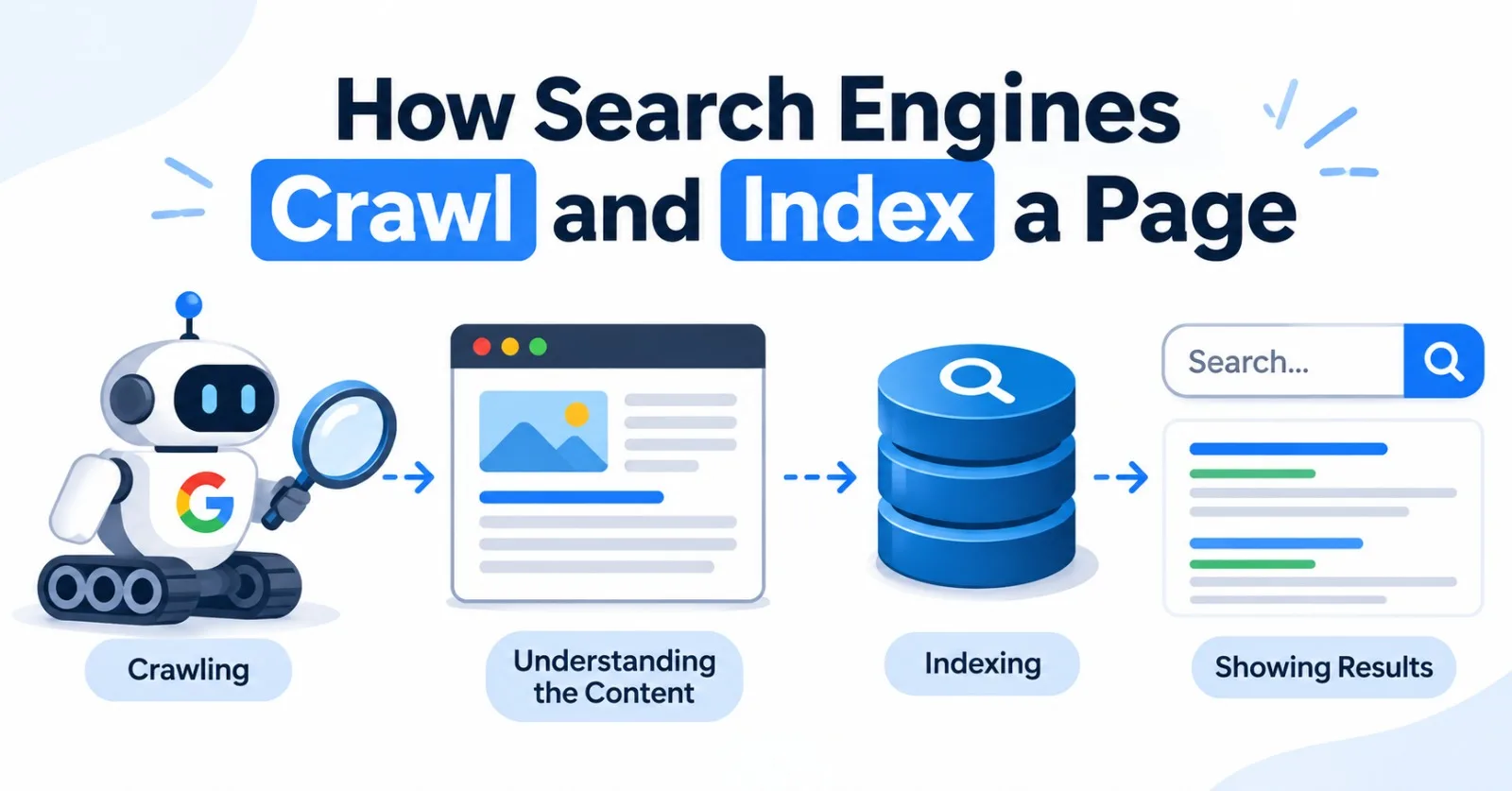
Before a page can show up in search results, a search engine has to find it, fetch it, understand it, and store it. Google describes this as three stages: crawling, indexing, and serving. Not every page makes it through all three.
This post covers the first two stages, plus the rendering step in between. Google is the example throughout, and other engines work in a broadly similar way.

No guarantees: Google can't promise that any page will be crawled, indexed, or shown, and it doesn't accept payment to crawl a site more often or rank it higher.
1. Discovery: How a URL Gets Found
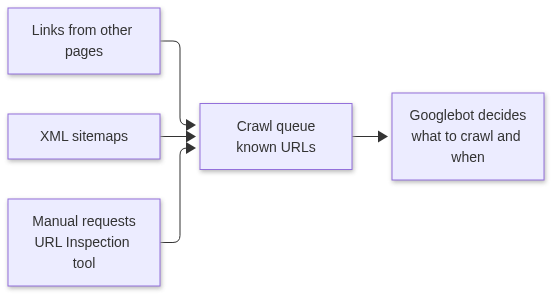
A search engine can only crawl URLs it knows about. There are three main routes:
| Source | How it works |
|---|---|
| Links | Crawlers follow links from pages they already know, on your site and on other sites |
| Sitemaps | A file where you list the URLs you want crawled |
| Manual requests | Search Console's URL Inspection tool lets you request indexing of a specific page |
Tip: Google can only discover links that are real <a> elements with an href attribute. Click handlers on other elements, and URL fragments used to load different content, aren't reliable.
A brand-new page or site can take days to weeks to be crawled and indexed.
2. Crawl Scheduling: What Gets Crawled, and How Often
Finding a URL doesn't mean it's crawled right away. Googlebot uses an automated process to decide which sites to crawl, how often, and how many pages to fetch from each. The result is called your crawl budget: the set of URLs Google can and wants to crawl.

Capacity protects your server. If it slows down or returns errors, Googlebot backs off.
Demand reflects how popular, fresh, and useful Google thinks your content is. A site move can temporarily raise it.
Do you need to worry about this? Probably not. Google's own crawl budget guide targets sites with 1 million or more unique pages that change weekly, or 10,000 or more pages that change daily. For everyone else, an up-to-date sitemap and a regular look at the Page indexing report are enough.
3. Fetching: robots.txt, Status Codes, and Size Limits
When Googlebot takes a URL from the queue, it first checks robots.txt. If crawling is allowed, it makes the HTTP request and acts on the response.
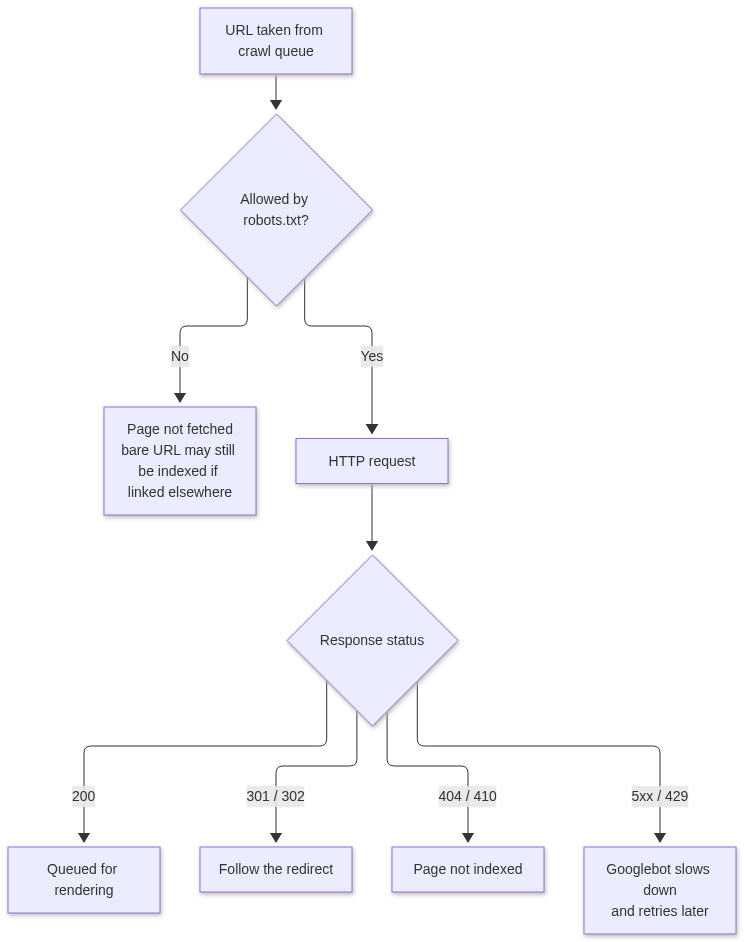
A typical robots.txt:
User-agent: *
Disallow: /cart/
Disallow: /internal-search/

Sitemap: https://example.com/sitemap.xml
robots.txt controls crawling, not indexing
This is the most common mix-up. A URL blocked in robots.txt can still appear in search results, without a description, if other sites link to it. To keep a page out of results, use noindex and leave the page crawlable so Googlebot can see the tag.

<!-- In the page's <head> -->
<meta name="robots" content="noindex">
For non-HTML files such as PDFs, send the same instruction as an HTTP header: X-Robots-Tag: noindex.
| Tool | Stops crawling? | Stops indexing? |
|---|---|---|
| robots.txt Disallow | Yes | Not reliably |
| noindex tag or header | No (page must be crawlable) | Yes |
| Password protection | Yes | Yes |
Avoid combining Disallow and noindex on the same URL: the crawler is blocked, so it never sees the noindex. Also note that Google ignores crawl-delay and does not support noindex inside robots.txt.
The 2 MB limit
Googlebot currently fetches only the first 2 MB of an individual URL (64 MB for PDFs). Anything after the cutoff is not fetched, rendered, or indexed. CSS and JavaScript files are fetched separately, each with its own limit. Most pages are far smaller, but if yours is large:
Move heavy CSS and JavaScript into external files.
Avoid large inline base64 images.
Put the important parts (
<title>, meta tags, canonical link, structured data) near the top of the HTML.
Google notes this limit isn't permanent and may change.
4. Rendering: Running the JavaScript
After fetching, Google renders the page with a recent version of Chromium so it can see content that JavaScript adds. Pages wait in a render queue, which can take a few seconds or longer.

What this means in practice:
Content must appear without interaction. Googlebot won't click, swipe, or type, so don't load primary content only after those actions.
Don't rely on JavaScript to remove
noindex. If the raw HTML saysnoindex, the page may never be rendered.Use real status codes. Single-page apps should return a true 404 for missing pages, or redirect to a URL that does, to avoid soft 404s.
Server-side rendering or pre-rendering is still a good idea. It speeds up the page for users, and not every bot runs JavaScript.
5. Indexing: Understanding and Storing the Page
Once Google has the rendered page, it analyzes the text, <title> elements, attributes like alt, images, and video. It then groups pages with similar content and picks one canonical version, the page that may be shown in results. The canonical page is the one stored and eligible to appear.
<link rel="canonical" href="https://example.com/blog/how-search-works">
Many pages that get crawled are never indexed. Common reasons are a noindex rule, a duplicate of another page, or content that Google judges to be low quality.

Mobile-first indexing
Google uses the mobile version of your content, crawled with its smartphone crawler, for indexing and ranking. Make sure the mobile page has the same primary content as desktop, and that no noindex or nofollow tag appears only on the mobile version.
6. Helping Your Pages Get Indexed
Link to every important page from other pages on your site.
Submit an XML sitemap and list only canonical, indexable URLs.
Keep servers fast and stable so crawl capacity stays healthy.
Request indexing for important new or updated pages in Search Console's URL Inspection tool. This isn't a guarantee, and it can still take days to weeks.
<?xml version="1.0" encoding="UTF-8"?>
<urlset xmlns="http://www.sitemaps.org/schemas/sitemap/0.9">
  <url>
    <loc>https://example.com/blog/how-search-works</loc>
    <lastmod>2026-11-01</lastmod>
  </url>
</urlset>
A single sitemap can hold up to 50,000 URLs or 50 MB uncompressed. Beyond that, split it and use a sitemap index file. Keep <lastmod> accurate and only change it when the content really changes. Google ignores <priority> and <changefreq>.
7. Reading the Page Indexing Report
Search Console's Page indexing report shows why URLs are or aren't indexed. A page not being indexed isn't automatically a problem; duplicates, redirects, and noindex pages shouldn't be.
| Status | What it means | What to check |
|---|---|---|
| Discovered - currently not indexed | Google knows the URL but hasn't crawled it yet | Internal links, server speed, crawl priority |
| Crawled - currently not indexed | Google fetched the page but chose not to index it | Content quality, uniqueness, duplication |
| Blocked by robots.txt | Crawling is disallowed | Remove the rule if the page should be indexed |
| Excluded by 'noindex' tag | The page asks not to be indexed | Remove the tag if unintended |
| Duplicate, Google chose different canonical than user | Google picked another URL as canonical | Canonical tags, redirects, internal links |
| Soft 404 | The page looks like an error but returns 200 | Return a real 404, or fix the content |
For one specific URL, use the URL Inspection tool instead.
8. Other Search Engines
Bing and others follow the same crawl, render, index, and serve pattern. One difference is notification: the IndexNow protocol lets you tell participating engines such as Bing and Yandex the moment a URL is added, changed, or deleted. Google doesn't use it, so for Google rely on sitemaps and Search Console. Either way, a notification is a hint; the engine still decides whether to crawl and index the page.
9. Troubleshooting: Why Isn't My Page Indexed?
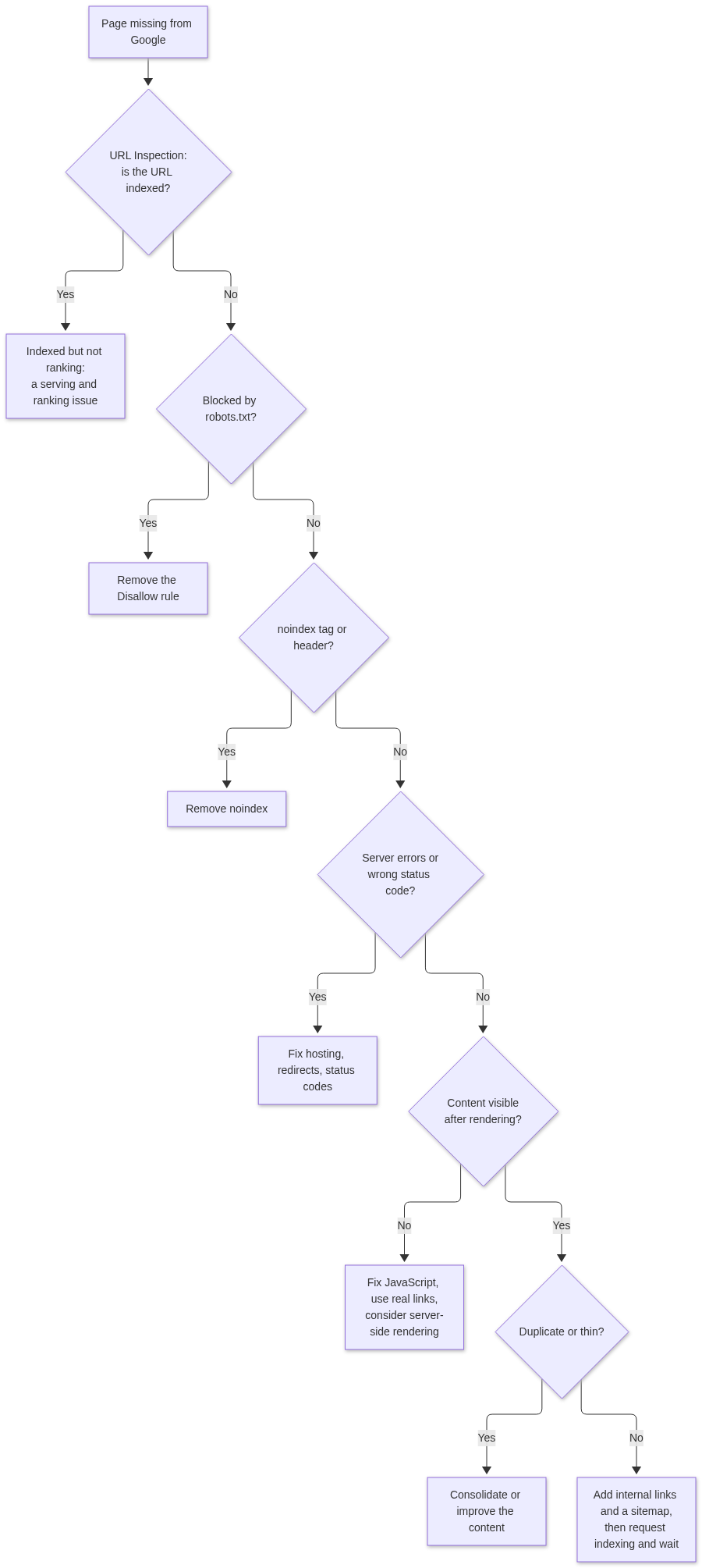
Quick Reference
| Stage | What happens | Common blockers |
|---|---|---|
| Discovery | Google finds the URL via links, sitemaps, or requests | No internal links, orphan pages, links that aren't <a href> |
| Crawling | Googlebot checks robots.txt and fetches the page | Disallow rules, server errors, slow responses, 2 MB cutoff |
| Rendering | Chromium runs JavaScript | Content needing interaction, noindex in raw HTML |
| Indexing | Google analyzes, picks a canonical, and stores the page | noindex, duplicates, low-quality content |
| Serving | Google matches indexed pages to queries and ranks them | Relevance and quality (not covered here) |
Final Thoughts
Search engines work like a pipeline: a page has to be found, allowed, fetched, rendered, understood, and judged worth keeping. When a page is missing from results, work through the stages in order, as the troubleshooting diagram does, and you'll usually find the blocker quickly.
Remember the key distinction: robots.txt controls what gets crawled, while noindex controls what gets indexed. Using the wrong one is behind a large share of indexing problems.
Published via ZyVOP — Write once in Markdown, auto-backup to GitHub, and syndicate to Dev.to, Medium & Hashnode in 1 click.
About the author
- One platform to write, cross-post to Dev.to, Medium, WordPress, Hashnode, and Bluesky, and protect your SEO with canonical links. Zero paywalls and full content ownership.
Comments
Join the discussionThe point about JavaScript-rendered content getting discovered late is one I've run into on client sites too. A page can be perfectly crawlable and still wait a long time in the render queue, so I try to keep critical content and internal links in the initial HTML. Do you have a preferred way to confirm what Googlebot actually rendered, beyond the URL inspection tool?
I usually use Google's Rich Results Test and inspect the rendered HTML, screenshot, loaded resources and JS errors. For historical crawls, I compare that with Search Console's crawled-page HTML and verified Googlebot server logs. A live test is useful, but it doesn't guarantee the same result as Google's previous crawl.